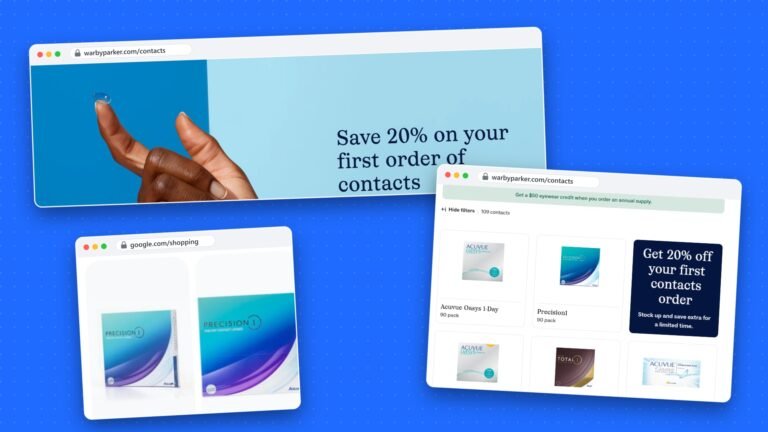
Subscription Ecommerce SEO: How to Keep Customers Reordering

A step-by-step playbook for subscription and repeat-order stores, using Warby Parker contact lenses as the example from first order to reorder.
On this page
    Add a header to begin generating the table of contents
    Scroll to Top

    Need an audit?

    Get a prioritized review of the issues affecting search visibility.

    Subscription and repeat-order stores live on the second order, not the first. The searches that decide it happen after the sale: how to reorder, what replaced a product, how to pause or cancel. If your site does not answer them, Google, Reddit and AI answers will.

    Key takeaways

    I use Warby Parker contact lenses as the running example in this playbook. Contacts are a textbook repeat purchase: customers run out on a schedule, and every reorder is a new chance to switch to a competitor.

    Each step below has the same shape: what to do, how to do it and what it looks like on a real site. Work through them in order, because each step depends on the one before it.

    Post-Purchase Searches That Decide the Next Order

    List every question a customer searches between the first order and the next one, and give each question a page on your site.

    Stage What they search Page that should answer
    Before buying "[brand] vs [competitor]", "is [brand] worth it" Comparison and pricing pages
    First order "[brand] first order discount", "[brand] setup" New-customer offer page, onboarding guide
    Reorder "how to reorder [brand]" Reorder help page and the product page
    Product change "[old product] replacement", "[old product] discontinued" The old product page, updated
    At risk "how to cancel [brand]", "[brand] alternatives" Pause, skip and cancel help page
    1. Export branded queries. In Search Console, filter queries containing your brand plus reorder, refill, cancel, pause, skip or replace.
    2. Match each query to a page. If no page answers it, that query goes to Reddit or a competitor.
    3. Write the answer first. Open each help page with the direct answer, then the steps.
    4. Check the search results. Search each query monthly and note who Google and AI Overviews cite.

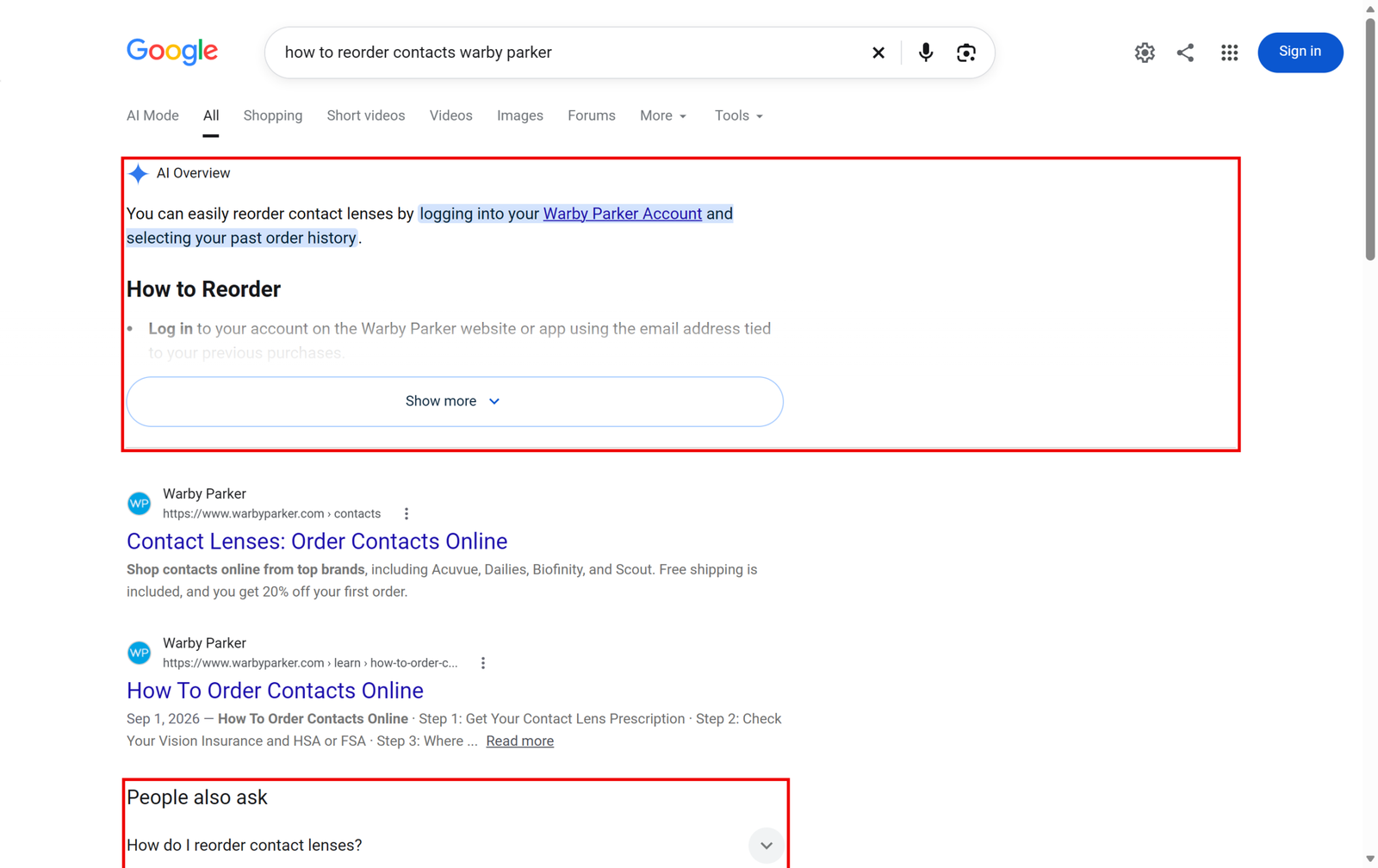
    Example: search "how to reorder contacts warby parker". The AI Overview answers with Warby Parker’s own process: log in to your Warby Parker account and select your past order history. Warby Parker’s contacts page and its how-to-order guide rank right below it, and People also ask adds the next question: how do I reorder contact lenses?

    Google for "how to reorder contacts warby parker"
    Google for "how to reorder contacts warby parker": an AI Overview that sends shoppers to their Warby Parker account, Warby Parker pages ranking below it, and People also ask. Source: Google search for "how to reorder contacts warby parker", captured October 25, 2026.

    New-Customer Offers That Turn Buyers Into Repeat Customers

    Make the first order easy to say yes to, and set it up so the second order is the default.

    1. State the value up front. Price, savings and delivery terms on the landing page, not at checkout.
    2. Remove the first-order friction. Apply the first-order discount automatically, with no promo code.
    3. Push a longer supply. Reward bigger first orders, which push the next decision further out.
    4. Make onboarding simple. Guide new customers through the key steps, such as uploading a prescription.
    5. Answer fast. One unanswered question during the first order can end the relationship.

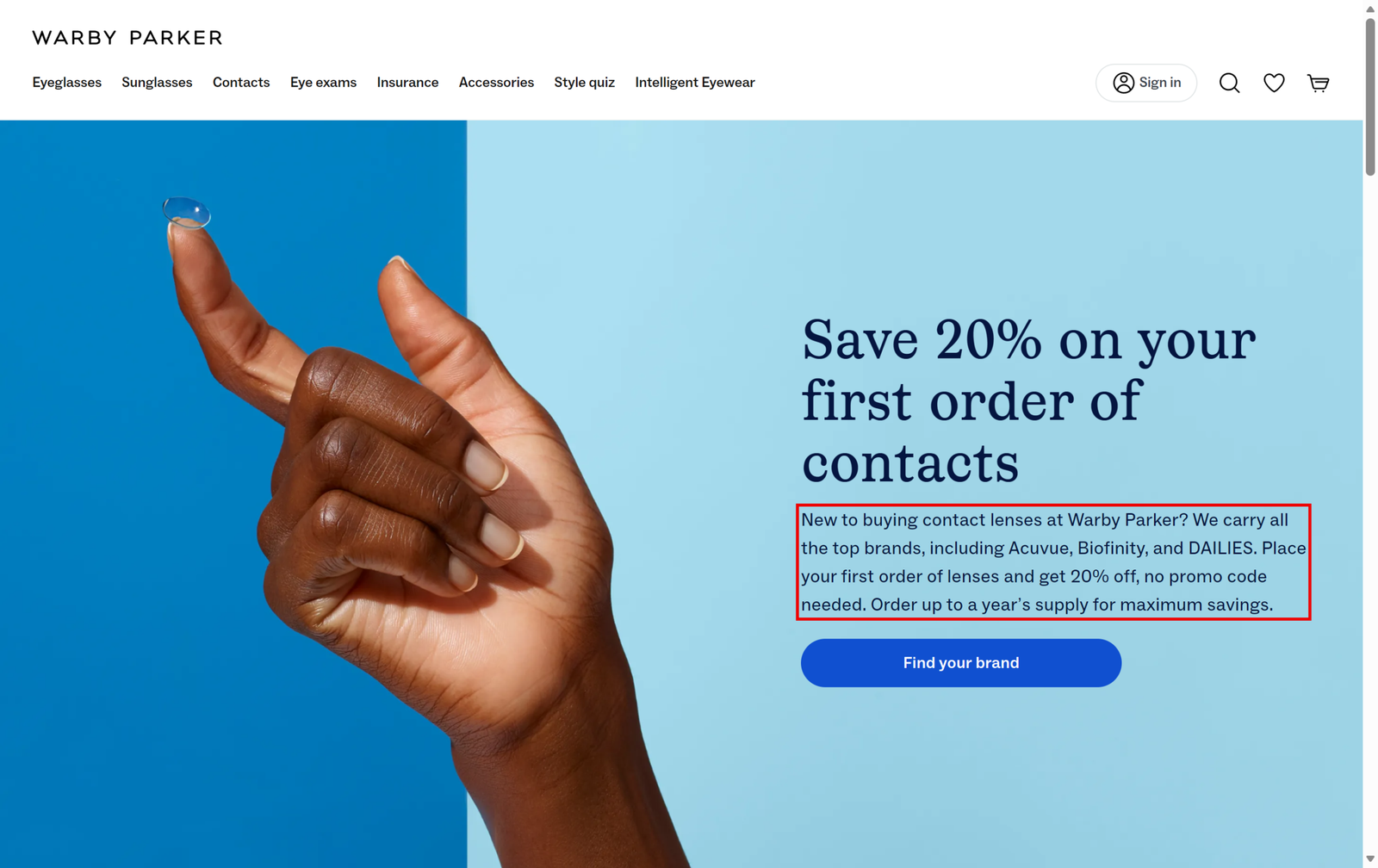
    Example: Warby Parker’s new-customer page does all of this in one block. It offers 20% off the first contacts order with no promo code needed, and it tells shoppers to order up to a year’s supply for maximum savings.

    Warby Parker's new-customer contacts page
    Warby Parker's new-customer contacts page: 20% off the first order, no promo code, and a nudge to order up to a year's supply. Source: warbyparker.com, captured October 25, 2026.

    Be clear about renewal terms if you auto-renew: the price after any discount, the renewal date and how to cancel. Check the auto-renewal disclosure rules in each state and country you sell to.

    Category Pages Built Around Repeat-Buyer Filters

    Build category pages around the attributes repeat buyers filter by, and make those attributes match the filters Google shows.

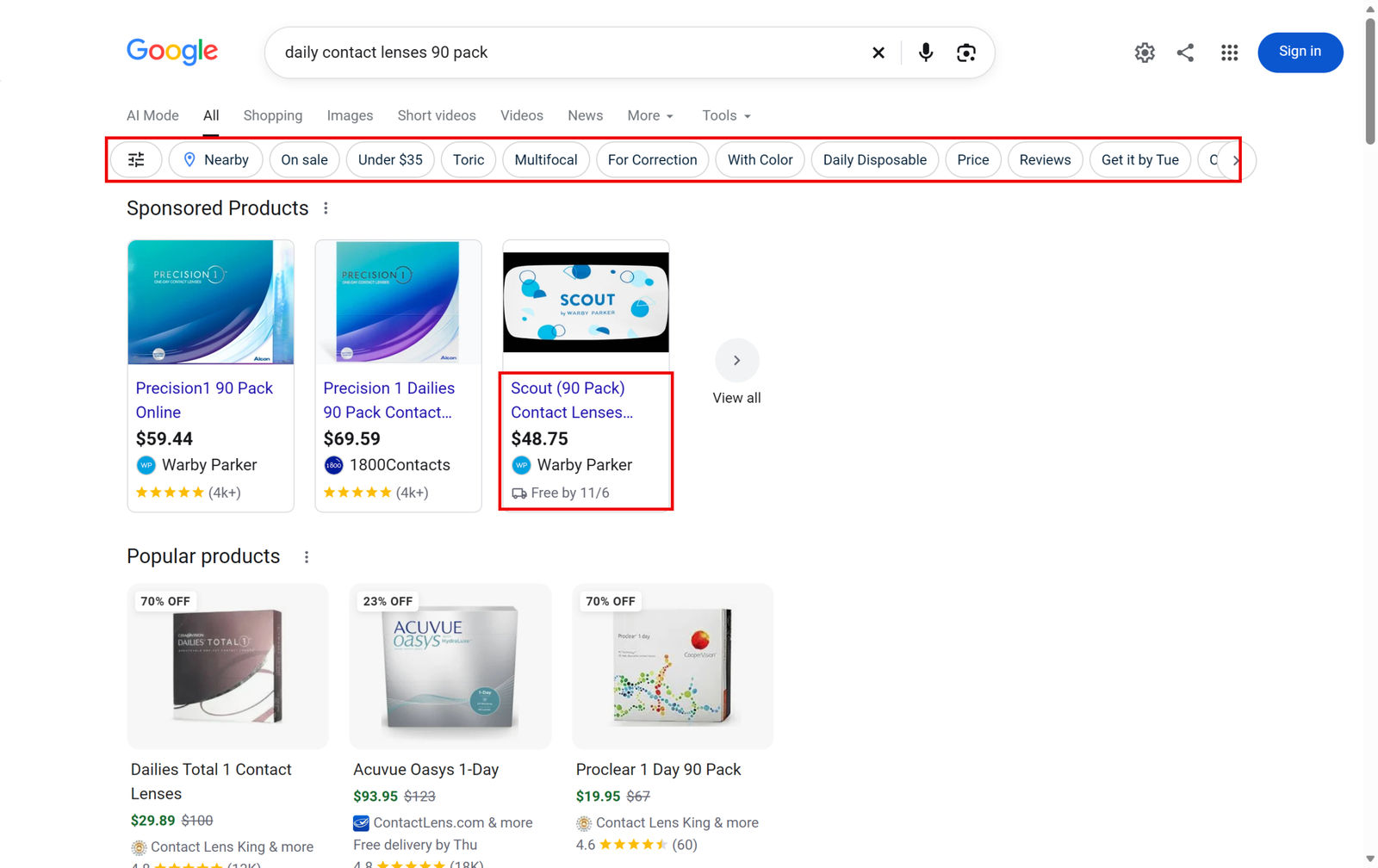
    Example: Google results for "daily contact lenses 90 pack" open with filter chips for Toric, Multifocal, Daily Disposable, price bands and more. Every chip is an attribute, so a store only stays visible after a shopper refines if its product data carries that attribute.

    The same results open with Sponsored Products, and the first ad is Warby Parker’s own: Scout (90 Pack) at $48.75. Scout is the lens Warby Parker has retired, which I come back to in the feed section below.

    Google for "daily contact lenses 90 pack"
    Google for "daily contact lenses 90 pack": attribute filter chips across the top, and a Warby Parker Shopping ad for Scout, a retired lens, at $48.75. Source: Google search for "daily contact lenses 90 pack", captured October 25, 2026.

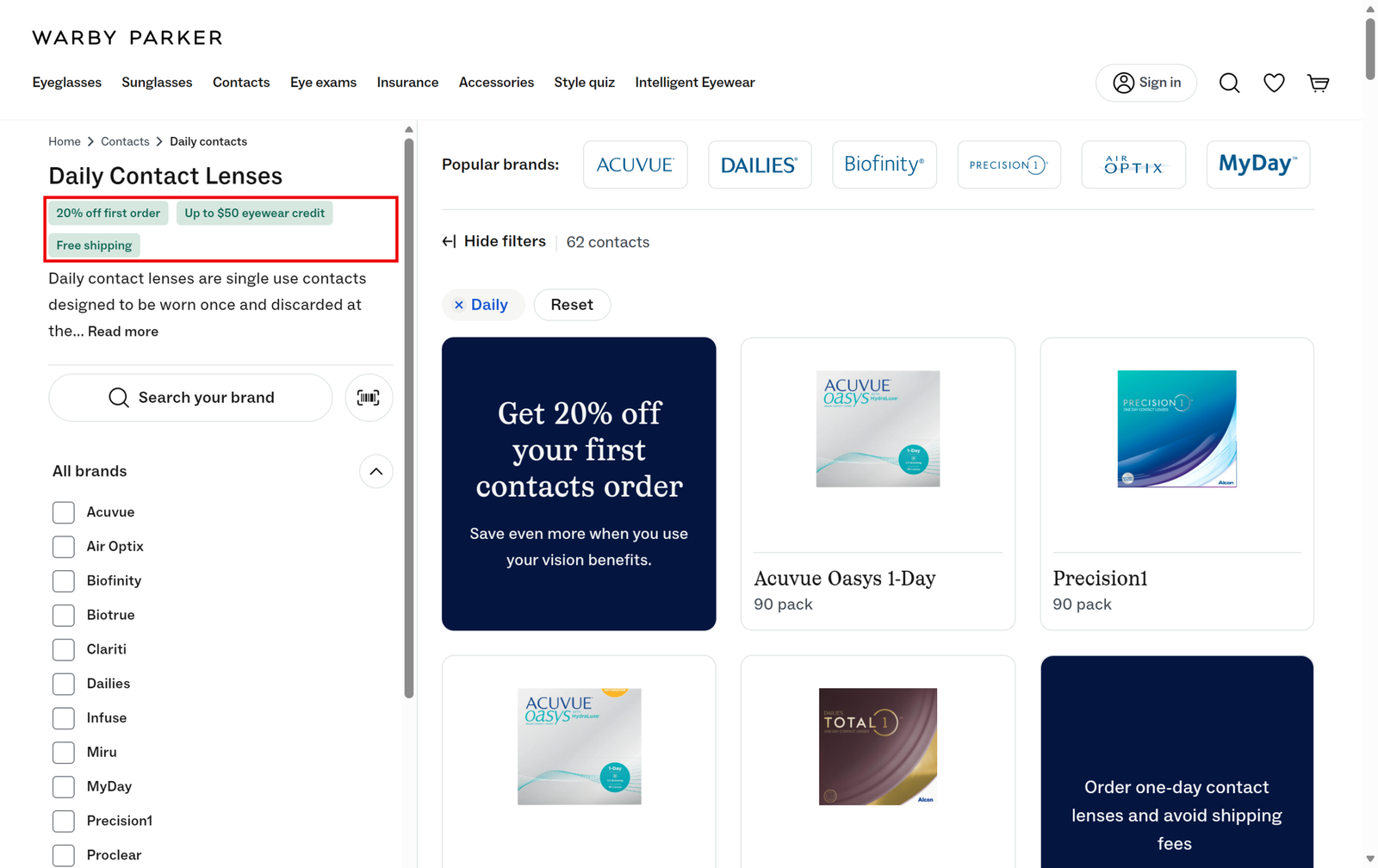
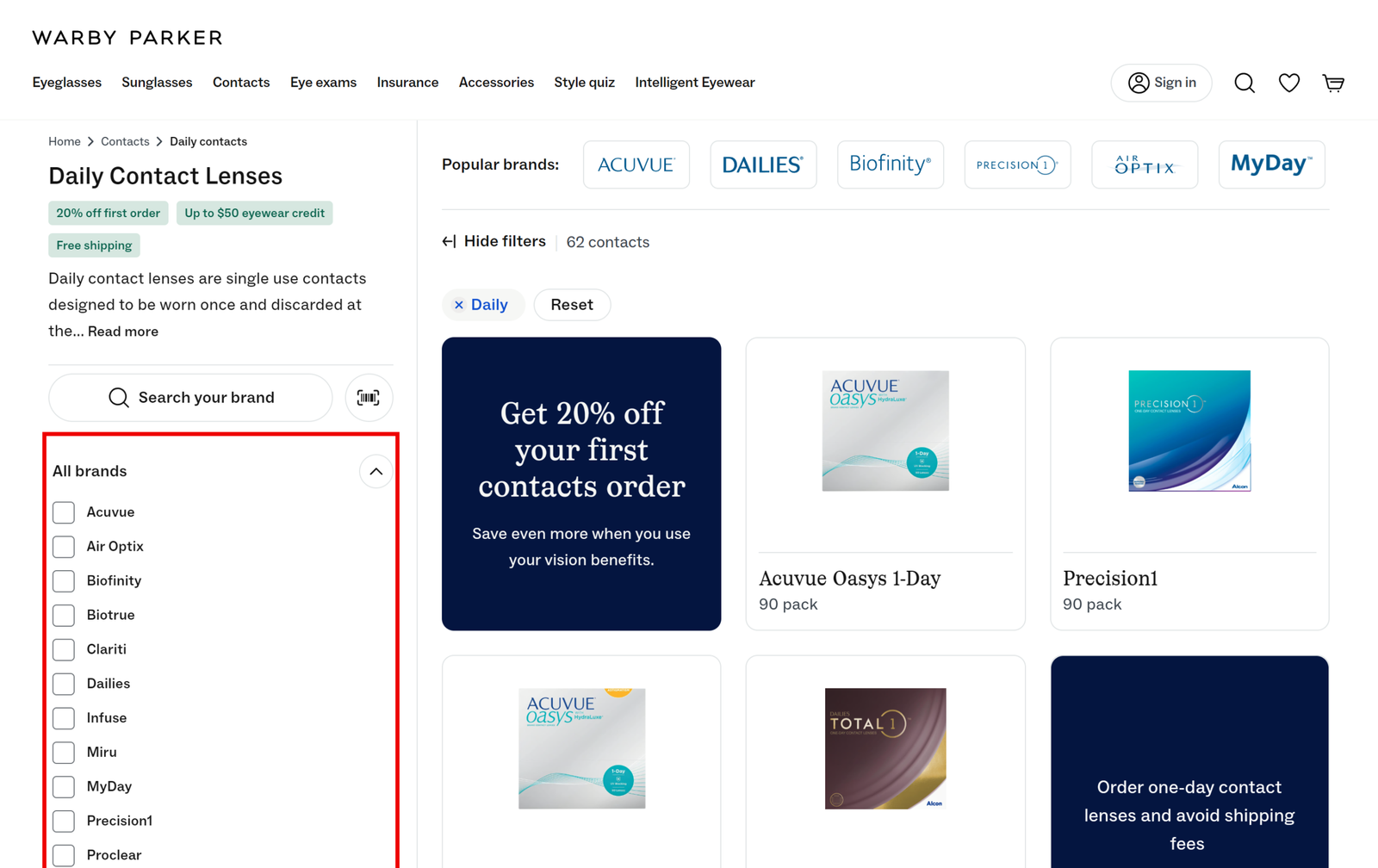
    Warby Parker answers with a lens-type category page. Daily Contact Lenses carries the offer badges at the top, and a brand filter down the side that links to every brand it sells.

    Warby Parker's Daily Contact Lenses page
    Warby Parker's Daily Contact Lenses page: 20% off first order, up to $50 eyewear credit and free shipping, right under the heading. Source: warbyparker.com, captured October 25, 2026.
    The same page: a brand filter listing every daily lens brand Warby Parker sells, which doubles as internal links
    The same page: a brand filter listing every daily lens brand Warby Parker sells, which doubles as internal links. Source: warbyparker.com, captured October 25, 2026.

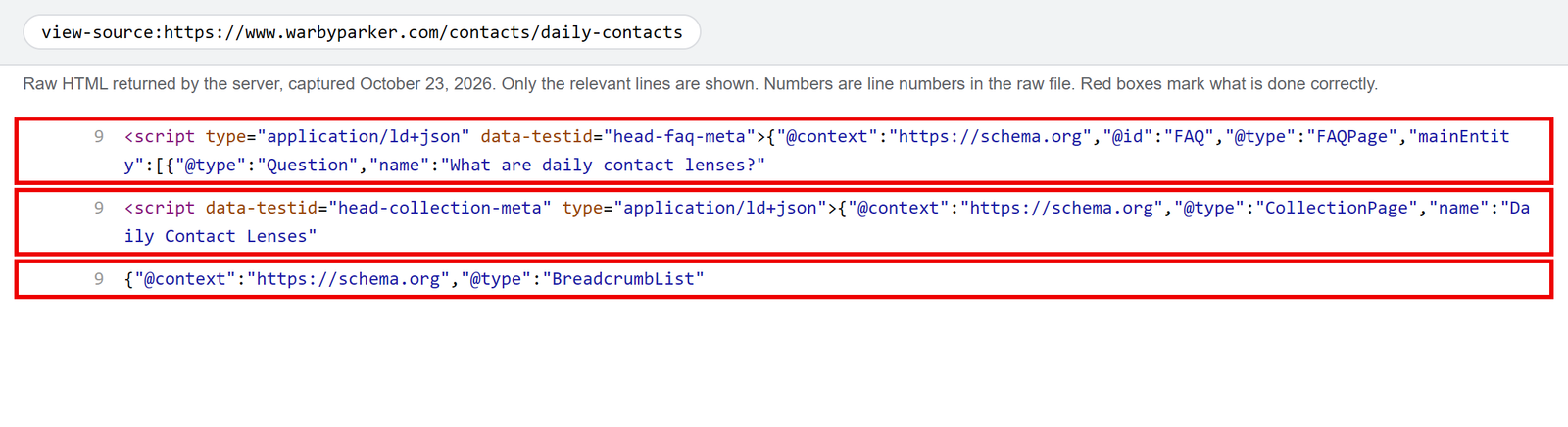
    The page’s code backs it up with structured data for the FAQ, the collection and the breadcrumb trail.

    The Daily Contact Lenses source: FAQPage, CollectionPage and BreadcrumbList structured data
    The Daily Contact Lenses source: FAQPage, CollectionPage and BreadcrumbList structured data. Source: warbyparker.com (page source), captured October 25, 2026.
    1. Search your top category queries. Record every filter chip Google shows.
    2. Match chips to attributes. Add any missing attribute and make it required in your product data.
    3. Build the landing pages. One indexable page per high-demand type, such as daily, bi-weekly or monthly lenses.
    4. Link them together. Brand filters, type pages and product pages should all link to each other.

    Price Comparison Searches Against Costco and Cheaper Retailers

    Accept that some shoppers can buy the same box for less somewhere else, and give them a reason to buy from you anyway. Put that reason on a page built for the comparison searches.

    Contacts make the problem obvious. A box of PRECISION1 is the same lens at every retailer, so the decision comes down to price, membership, insurance and convenience. Repeat buyers run that comparison again before every reorder.

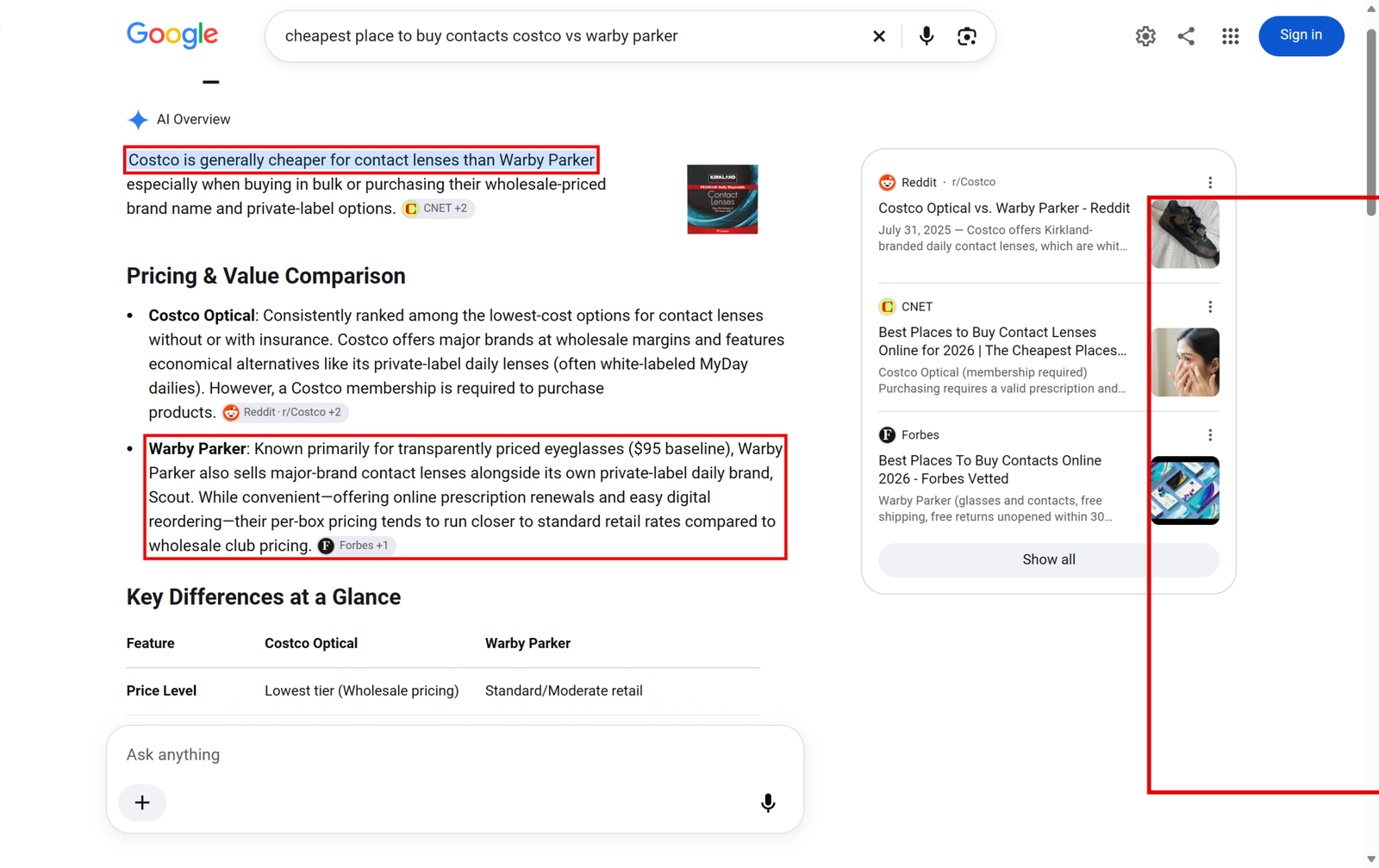
    Example: I searched "cheapest place to buy contacts costco vs warby parker". The AI Overview opens with "Costco is generally cheaper" and then lists Warby Parker’s perks. It cites CNET, Forbes and a Reddit thread, not Warby Parker. It also calls Scout Warby Parker’s private-label lens, a product Warby Parker has retired.

    Google for "cheapest place to buy contacts costco vs warby parker"
    Google for "cheapest place to buy contacts costco vs warby parker": the AI Overview leads with Costco being cheaper, cites CNET, Forbes and Reddit, and still names Scout as Warby Parker's own lens. Source: Google search for "cheapest place to buy contacts costco vs warby parker", captured October 25, 2026.

    People also ask lists the next searches. Is Warby Parker cheaper than Costco Optical? Is Costco the cheapest place to buy contact lenses? Who has the lowest price for contacts? Are contacts cheaper through Warby Parker? Warby Parker has no page that answers them, so third parties write the answer.

    Why-Buy-Here Value That Beats a Lower Box Price

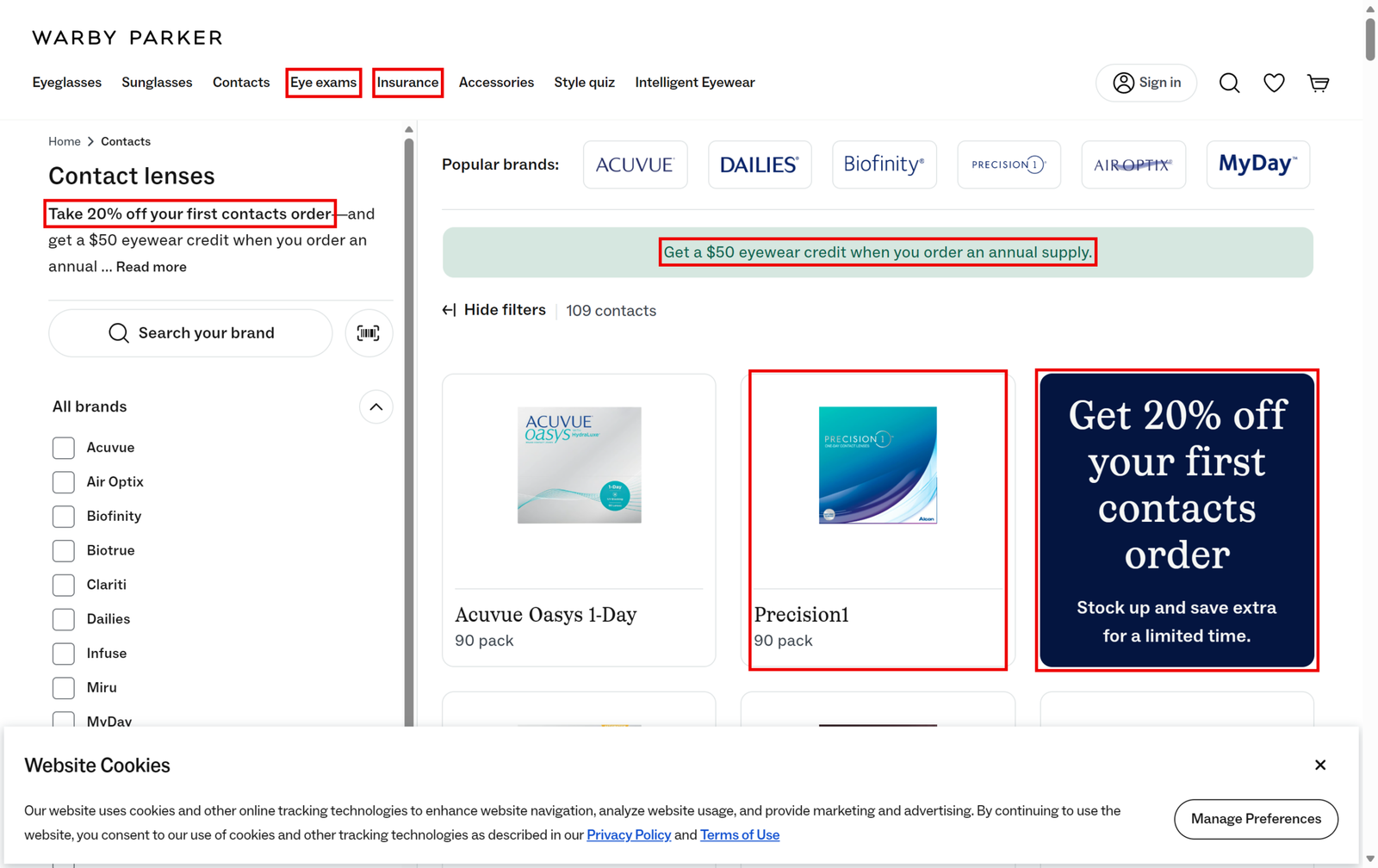
    Warby Parker does have a case to make. Its contacts page promotes 20% off the first contacts order, a $50 eyewear credit on an annual supply and free shipping, with Eye exams and Insurance in the main menu. None of it sits on a page built for the comparison query, and the product cards on the contacts page show no price.

    Warby Parker's contacts page: 20% off the first order, a $50 eyewear credit on an annual supply, Eye exams and Insurance in
    Warby Parker's contacts page: 20% off the first order, a $50 eyewear credit on an annual supply, Eye exams and Insurance in the menu, and product cards with no price. Source: warbyparker.com, captured October 25, 2026.

    Costco’s lower price comes with a paid membership. That gives every retailer without one an honest angle: compare the total cost of a year of lenses, not the price of a box.

    1. Search the comparison queries. Run "[brand] vs Costco", "is [brand] cheaper than [competitor]" and "cheapest place to buy ". Record who the AI Overview cites.
    2. Build one comparison page. Compare the total cost of a year: membership, insurance, rebates, credits, shipping and returns, with the date you checked.
    3. Show the price on every card. Category and product cards should show the price per box, so shoppers and crawlers can compare.
    4. Answer the People also ask questions. Give each one a short, direct answer on the comparison page.
    5. Name what only you offer. Eye exams, insurance billing, prescription renewals and a credit toward glasses are reasons to buy here. Say them in plain text.
    6. Be fair about price. If a warehouse club is cheaper for some shoppers, say who it suits. A fair comparison is the page an answer engine is willing to quote.

    Google Merchant Center Feeds and Google Shopping Listings for Reorders

    Treat the Merchant Center feed as a second product page. It decides how your products appear in Google Shopping, in product listings on Search and in AI surfaces, and it has to agree with the site.

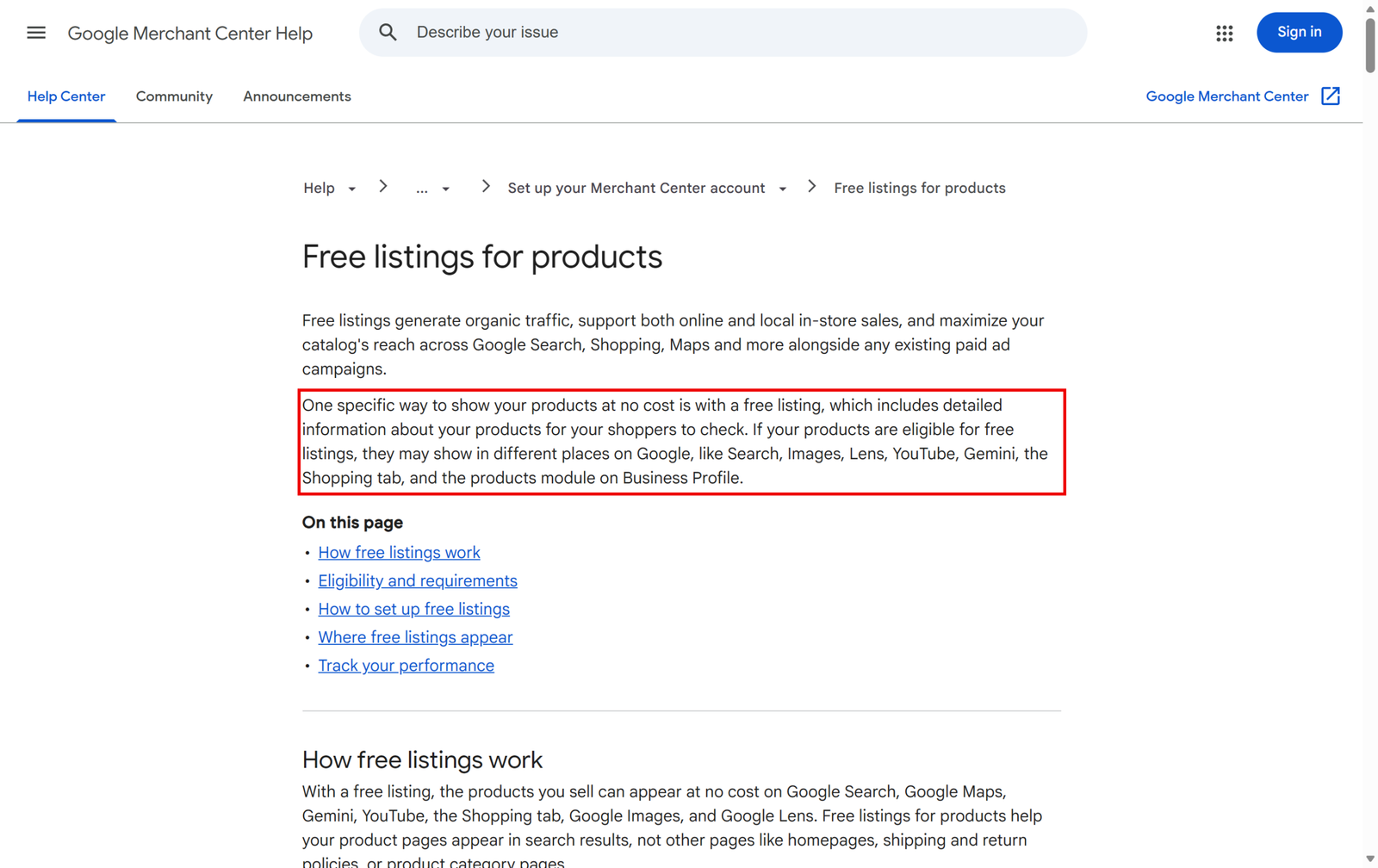
    Google’s own help page says free listings can show on Search, Images, Lens, YouTube, Gemini, the Shopping tab and Business Profile. All of them read the same feed.

    Google Merchant Center help: free listings can show on Search, Images, Lens, YouTube, Gemini, the Shopping tab and Business
    Google Merchant Center help: free listings can show on Search, Images, Lens, YouTube, Gemini, the Shopping tab and Business Profile. Source: support.google.com, captured October 25, 2026.

    Branded Shopping Searches Where Competitors Bid

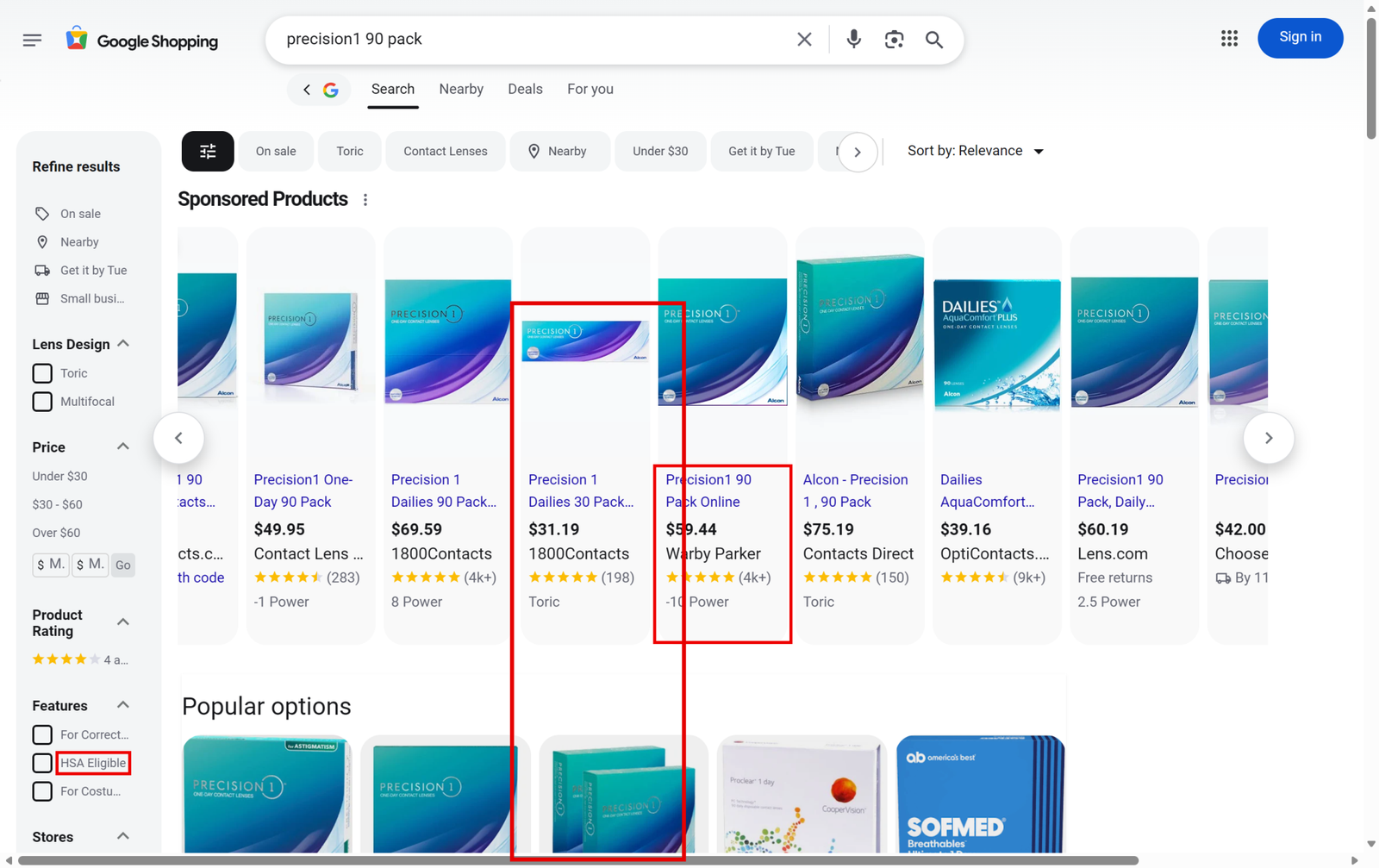
    Example: in Google Shopping for "precision1 90 pack", Warby Parker runs an ad for the 90-pack at $59.44, next to 1800Contacts at $69.59 and Contacts Direct at $75.19. The left rail carries filters such as HSA Eligible and a list of stores, and each one comes from feed data.

    Google Shopping for "precision1 90 pack"
    Google Shopping for "precision1 90 pack": Warby Parker's 90-pack ad at $59.44 beside 1800Contacts at $69.59, with an HSA Eligible filter in the left rail. Source: Google search for "precision1 90 pack", captured October 25, 2026.

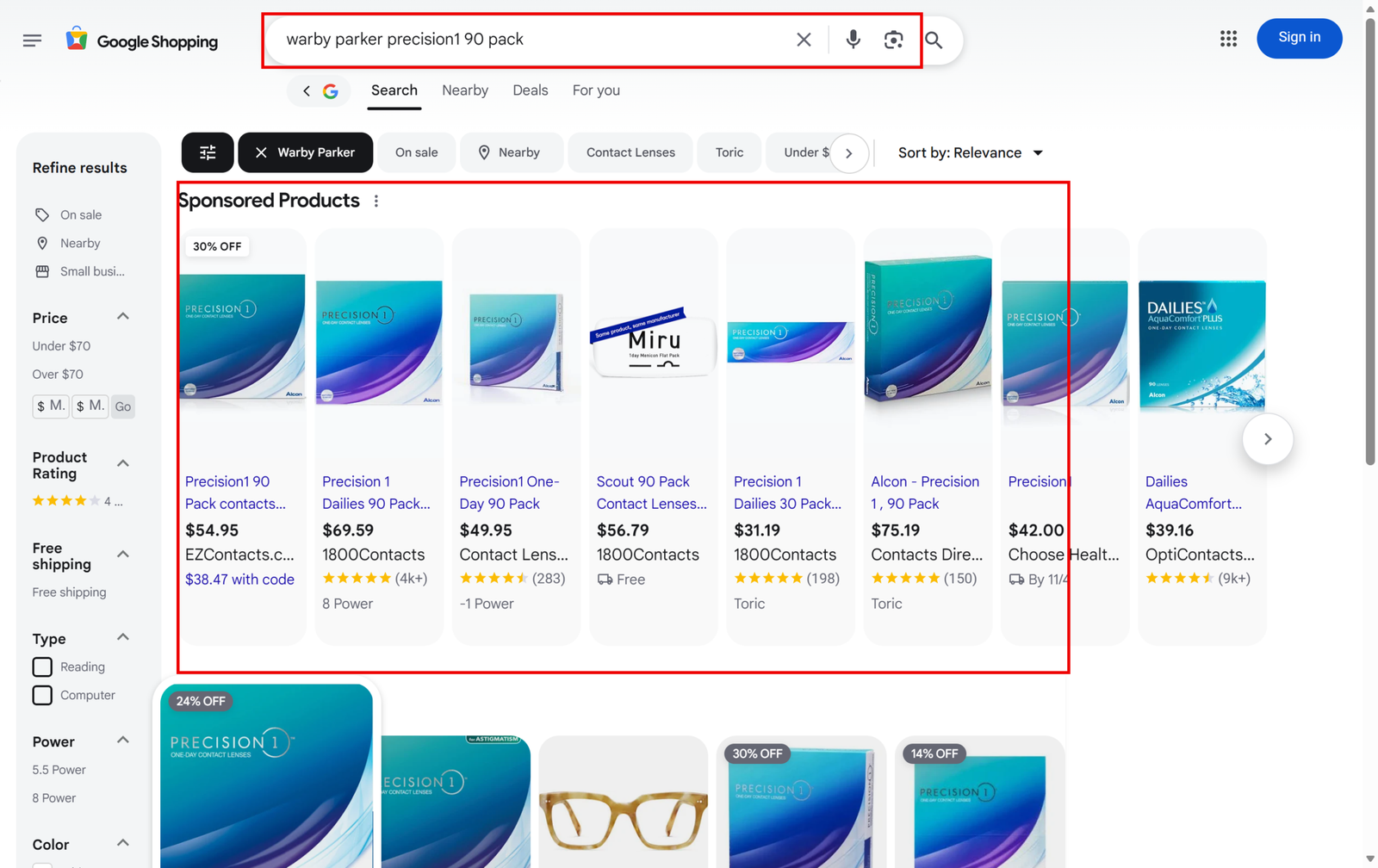
    Click the Warby Parker store filter and Google rewrites the search to "warby parker precision1 90 pack". The sponsored row then fills with competitors: 1800Contacts, EZContacts, Contact Lens King and Contacts Direct. A shopper who asked for Warby Parker by name sees other retailers first.

    After the Warby Parker store filter
    After the Warby Parker store filter: the query becomes "warby parker precision1 90 pack" and every sponsored listing in view is a competitor. Source: Google search for "warby parker precision1 90 pack", captured October 25, 2026.

    That is the lesson for any repeat-order brand. Branded product searches are reorder searches, and competitors bid on them. Cover them with your own Shopping ads and free listings, and put brand, product line and pack size in every feed title.

    Feed Hygiene for Retired Products and Pack Sizes

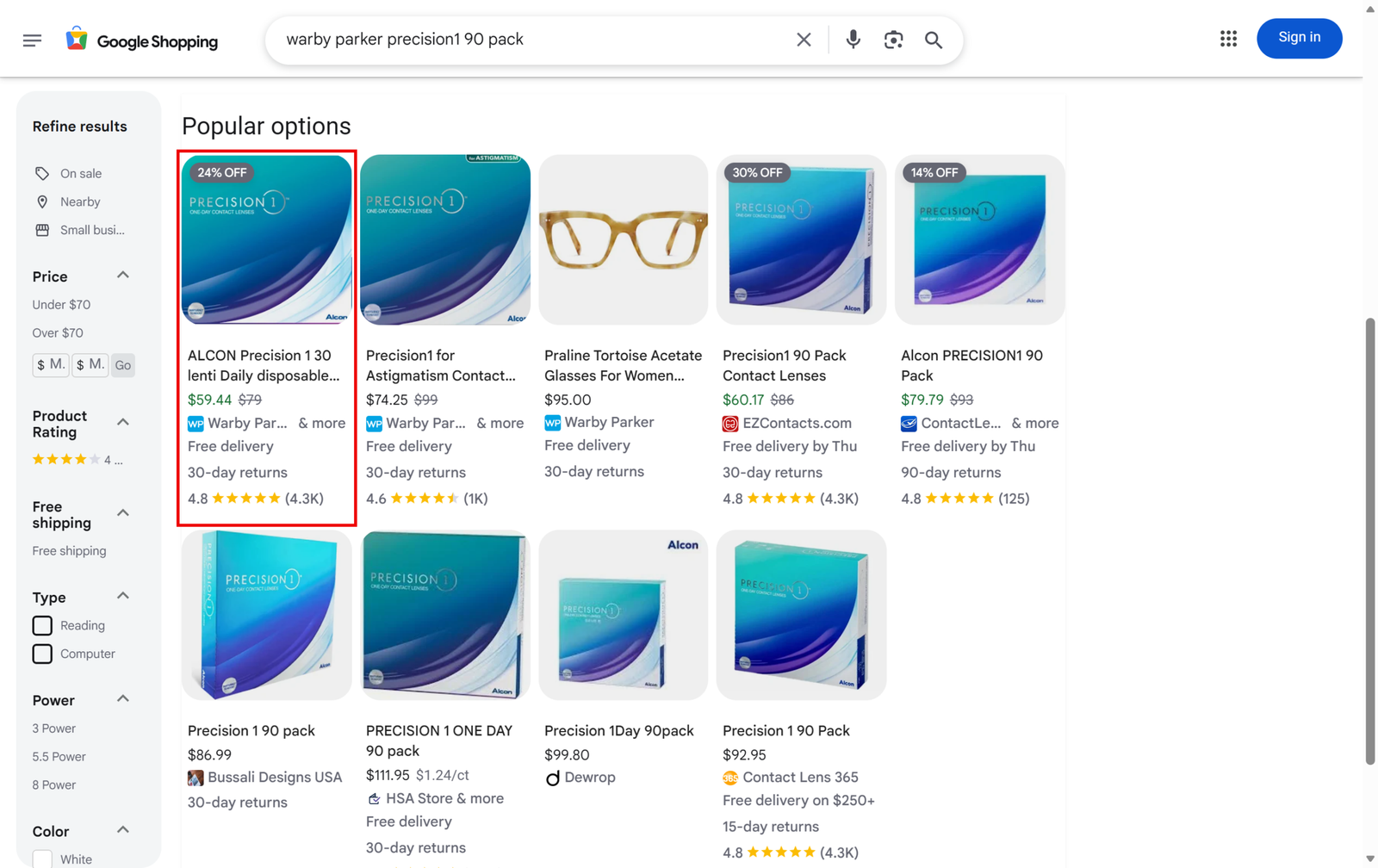
    Two feed problems show up in these searches. Scout, the lens Warby Parker retired, still runs as a Warby Parker Shopping ad at $48.75, as the category section above shows. In the filtered results, Google also groups the Warby Parker PRECISION1 offer under the title "ALCON Precision 1 30 lenti". That is a 30-lens title in Italian, on a search for the 90-pack.

    The filtered Warby Parker results
    The filtered Warby Parker results: the PRECISION1 offer at $59.44 under a catalog title that reads "ALCON Precision 1 30 lenti". Source: Google search for "warby parker precision1 90 pack", captured October 25, 2026.

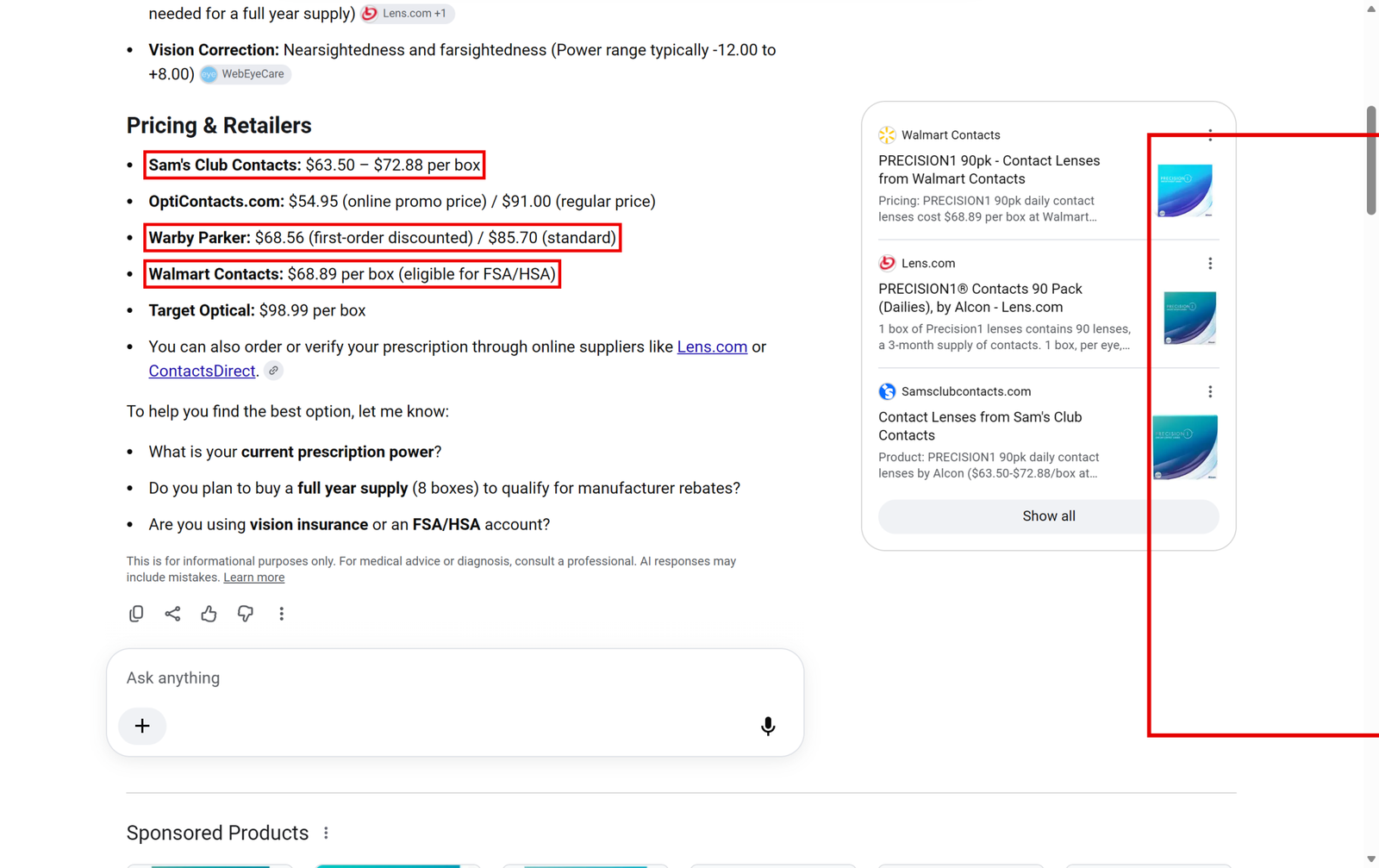
    Prices drift too. On the same day, the AI Overview for "precision1 90 pack" gave Warby Parker’s price as $68.56 for a first order and $85.70 standard, while the Shopping ad showed $59.44. A shopper comparing them cannot tell which price is current.

    1. Remove retired products from the feed. Until they are gone, set availability to out of stock so Shopping stops selling them.
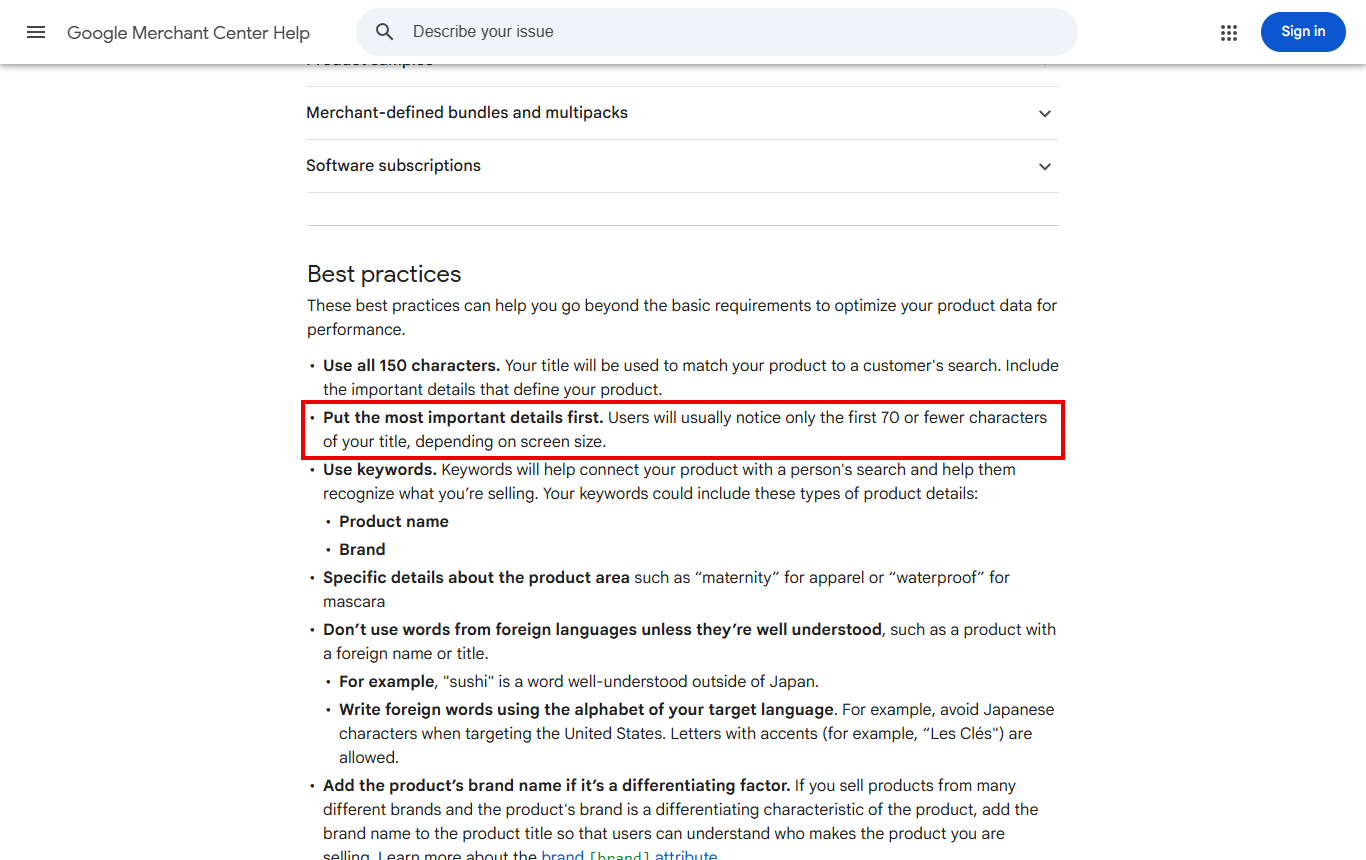
    2. Lead the title with brand, line and pack size. For example "Alcon PRECISION1 Daily Contact Lenses, 90 Pack". Shoppers usually notice only the first 70 characters.
    3. Separate every pack size. Give each pack size its own item, with its own GTIN, so it maps to the right catalog product.
    4. Keep price and availability in sync. The feed, the structured data and the page must show the same price, or Merchant Center flags a mismatch.
    5. Add the attributes shoppers filter on. Health-account eligibility, pack size, replacement schedule and power, where Merchant Center supports them.
    6. Check your branded Shopping results monthly. Filter by your own store and note who bids on your brand and product names.
    Google Merchant Center's title guidance
    Google Merchant Center's title guidance: put the most important details first, because users usually notice only the first 70 or fewer characters. Source: support.google.com, captured October 25, 2026.

    Member Pricing With the Loyalty Program Attribute

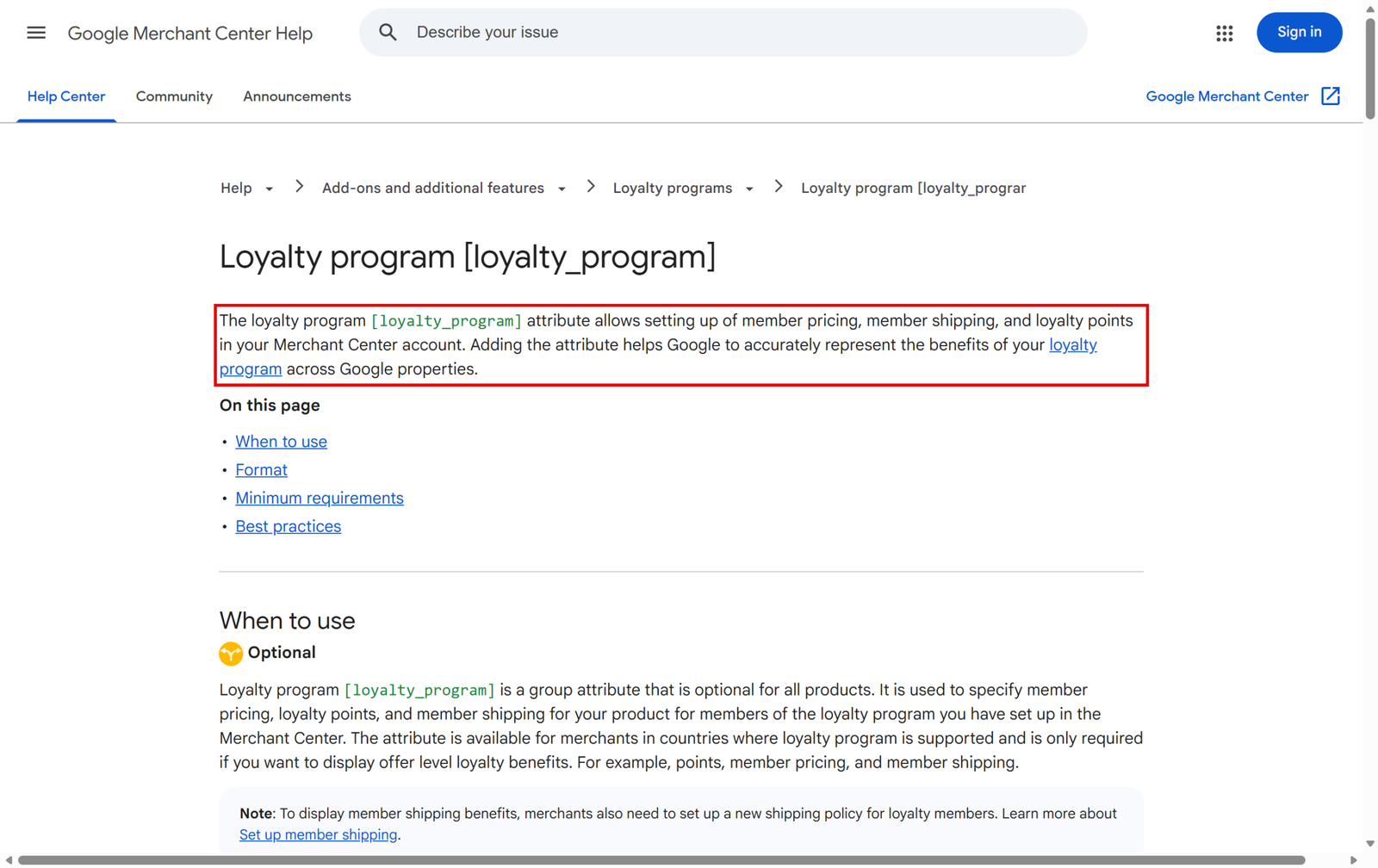
    Costco’s price depends on a membership, and Merchant Center has a field for that model. A retailer with its own program can send member prices through the loyalty_program attribute instead of the regular price. Google says the attribute helps it represent the program’s benefits across Google properties.

    Google Merchant Center help: the loyalty_program attribute sets up member pricing, member shipping and loyalty points
    Google Merchant Center help: the loyalty_program attribute sets up member pricing, member shipping and loyalty points. Source: support.google.com, captured October 25, 2026.

    For a subscription brand, the subscriber price is the natural member price. Set the program up in Merchant Center and send that price through the attribute, so a shopper comparing boxes sees the price a member actually pays.

    Discontinued Product Pages That Keep Rankings and Customers

    Never delete the page of a product your customers reorder. Keep it live, say clearly what replaced it, and send the customer straight to the replacement.

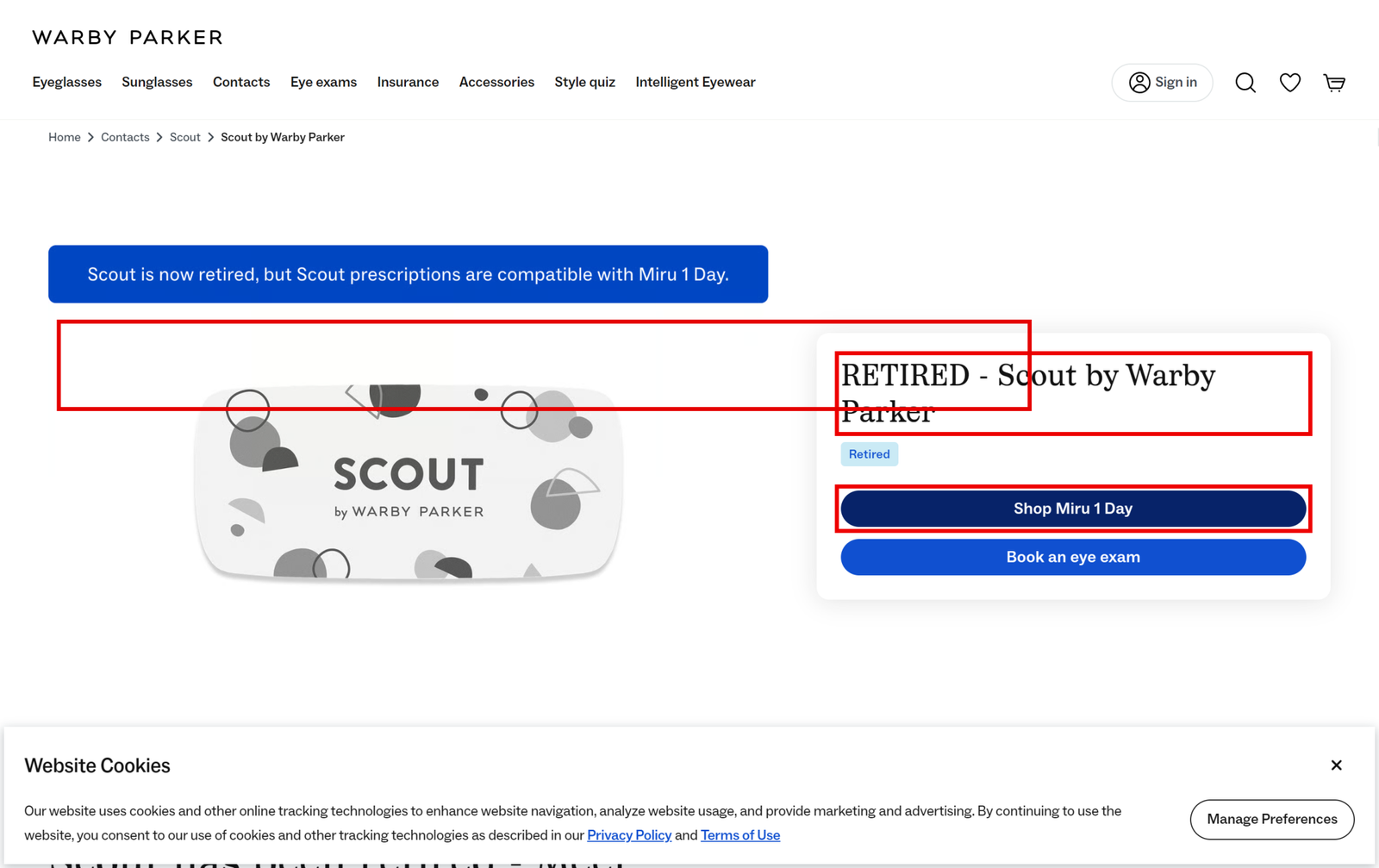
    Example: Warby Parker retired its Scout daily lenses. The Scout page is still live. A banner says Scout prescriptions work with the replacement, Miru 1 Day, the heading reads RETIRED, and the main button says Shop Miru 1 Day.

    Warby Parker's Scout page: a banner saying Scout prescriptions work with Miru 1 Day, a RETIRED heading and a Shop Miru 1 Day
    Warby Parker's Scout page: a banner saying Scout prescriptions work with Miru 1 Day, a RETIRED heading and a Shop Miru 1 Day button. Source: warbyparker.com, captured October 25, 2026.

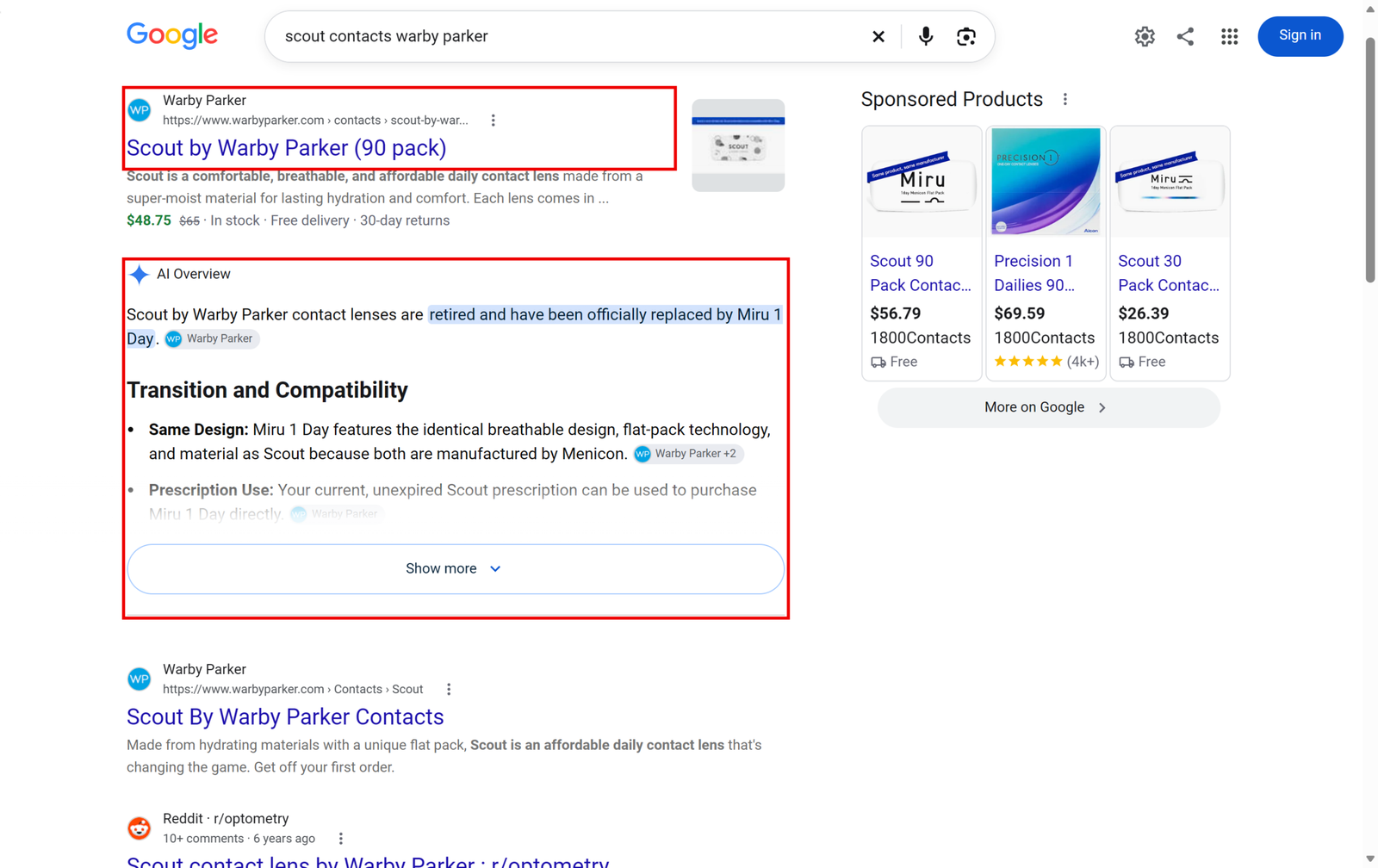
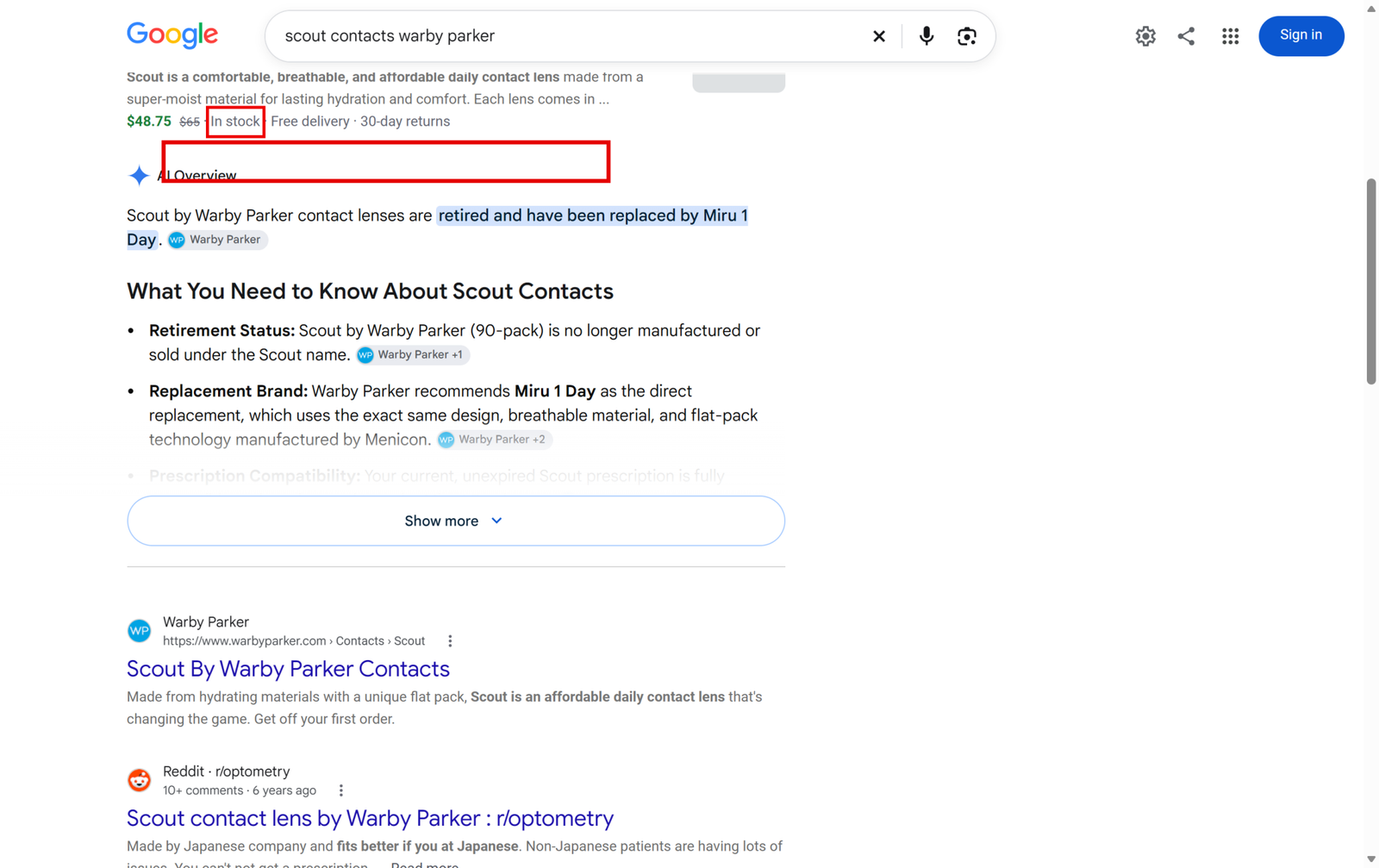
    It works. Search "scout contacts warby parker" and the old Scout page still ranks first. The AI Overview cites Warby Parker to tell searchers that Scout was replaced by Miru 1 Day. The search equity and the customer both stay with the brand.

    Google for "scout contacts warby parker"
    Google for "scout contacts warby parker": the retired Scout page still ranks first, and the AI Overview cites Warby Parker to explain the switch to Miru 1 Day. Source: Google search for "scout contacts warby parker", captured October 25, 2026.

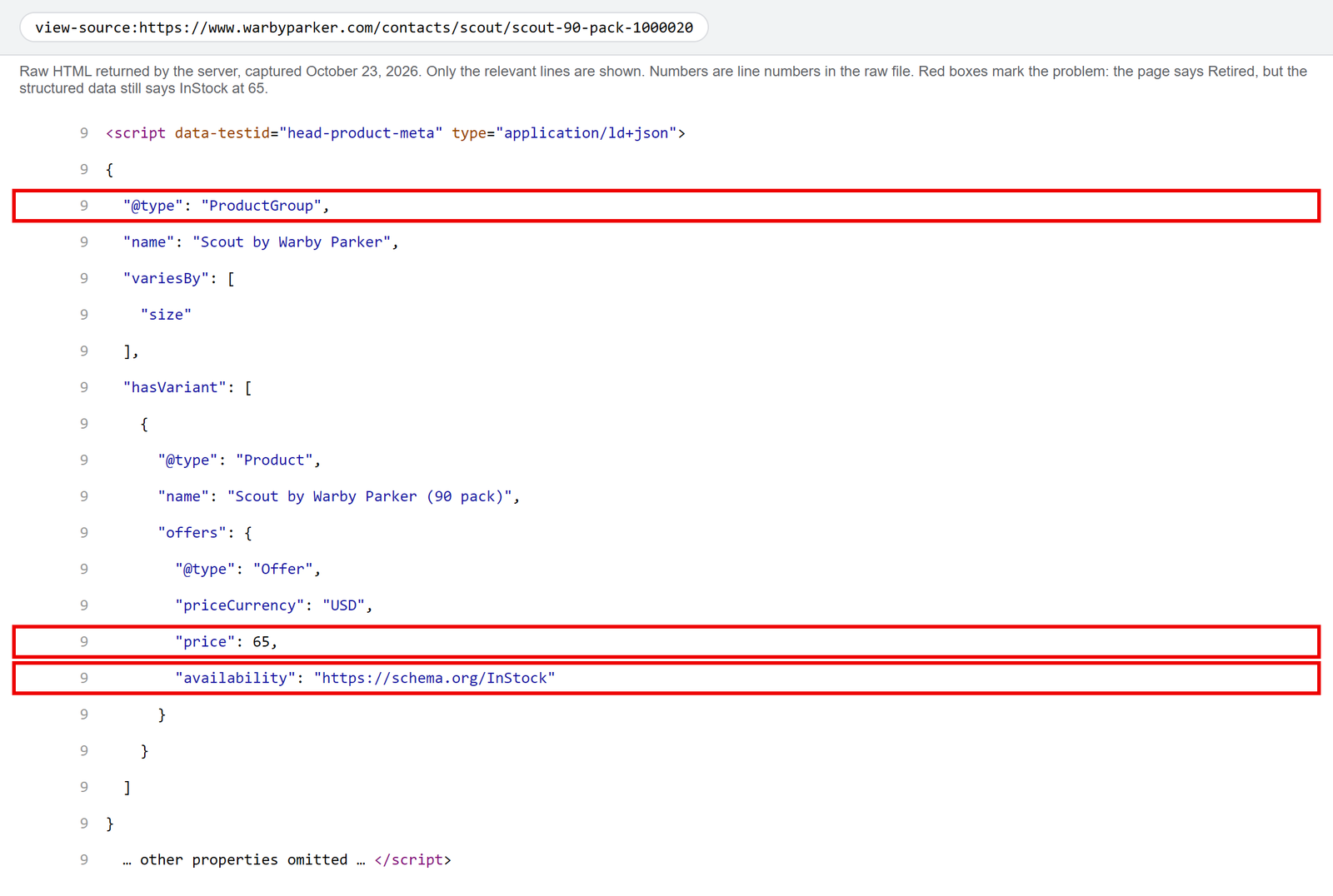
    There is one thing to fix. The page’s structured data still marks Scout as InStock at $65, and Google’s result still shows a price, In stock and free delivery for a product that is retired.

    The Scout page source: the ProductGroup offer still says price 65 and InStock, even though the page says Retired
    The Scout page source: the ProductGroup offer still says price 65 and InStock, even though the page says Retired. Source: warbyparker.com (page source), captured October 25, 2026.
    The result Google shows for the retired page: a price, In stock and free delivery, taken from the outdated structured data
    The result Google shows for the retired page: a price, In stock and free delivery, taken from the outdated structured data. Source: Google search for "scout contacts warby parker", captured October 25, 2026.
    1. Keep the URL. The page keeps returning a 200 status, with no redirect while customers still search for the old name.
    2. Rewrite the top of the page. Say it is discontinued, name the replacement and explain what carries over.
    3. Make the replacement the main action. The primary button goes to the new product.
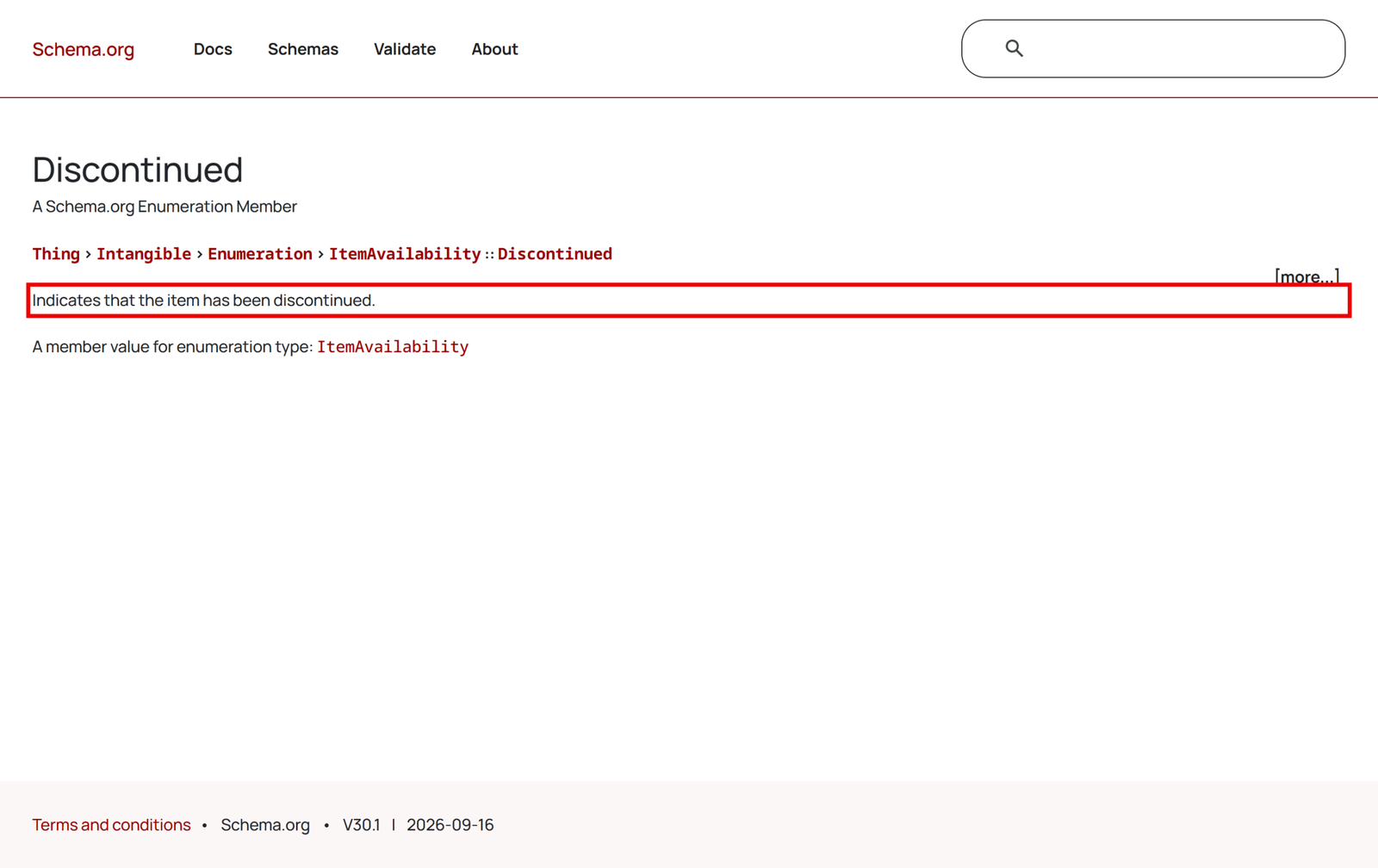
    4. Update the structured data. Set availability to Discontinued, or remove the offer, so search results stop showing a price.
    5. Update the feed. Remove the old product from Merchant Center so it stops appearing in shopping results.
    Schema.org: Discontinued is an availability value that indicates the item has been discontinued
    Schema.org: Discontinued is an availability value that indicates the item has been discontinued. Source: schema.org, captured October 25, 2026.

    Involuntary Churn From Failed Subscription Payments

    Stop losing customers who never chose to leave. Involuntary churn is the subscribers a brand loses to failed payments, and most of it is fixable in billing settings.

    1. Turn on smart retries. Rerun failed charges at better times instead of on a fixed schedule.
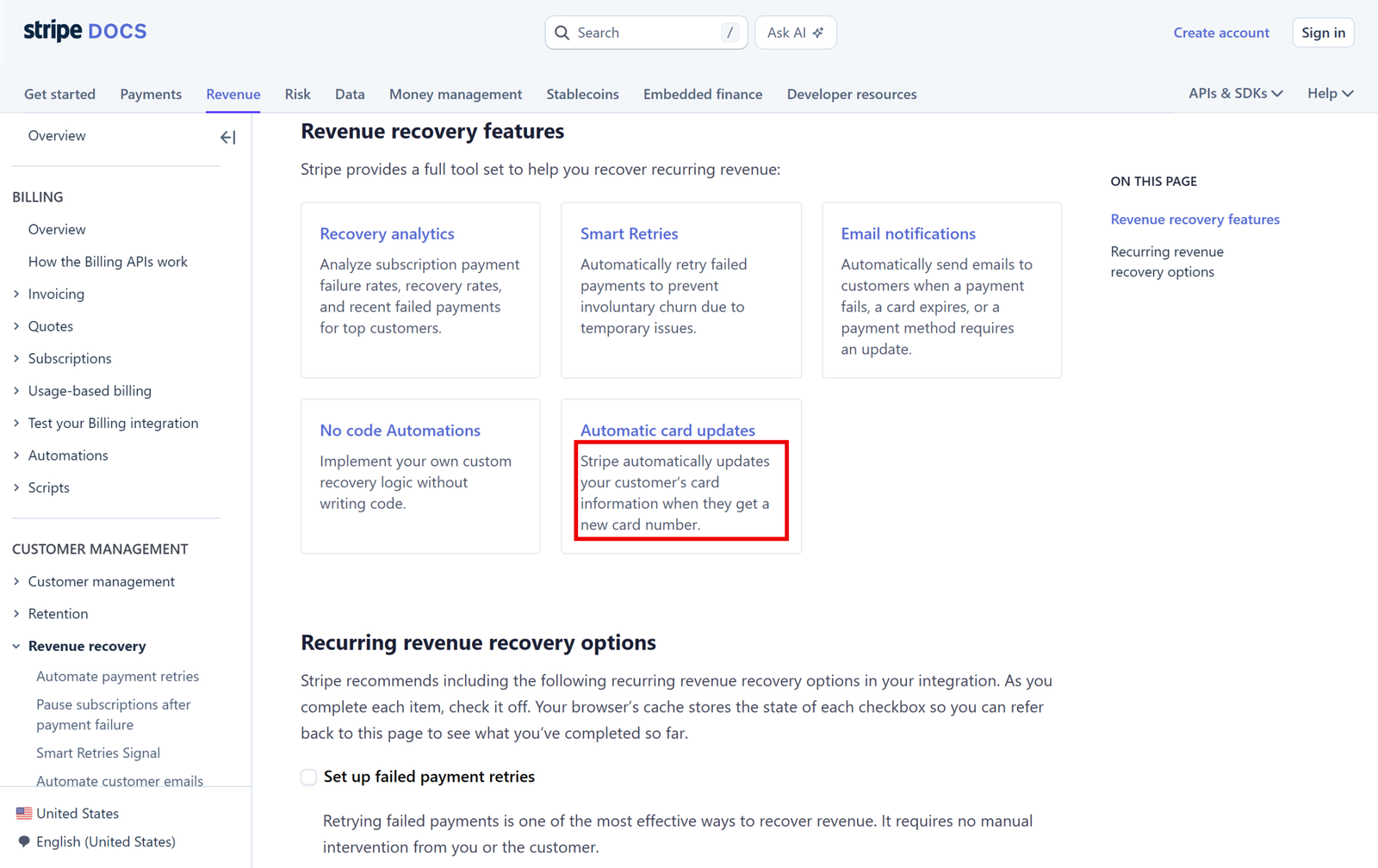
    2. Turn on automatic card updates. Refresh card details when a customer gets a new card number.
    3. Send failed-payment emails. Include a one-click link to update the card.
    4. Add a grace period. Give customers time to fix a payment before the subscription pauses.
    5. Offer flexible billing. Monthly, quarterly and annual plans, with clear renewal dates and reminders before each charge.
    6. Make account management self-serve. Customers update payment methods and preferences without contacting support.

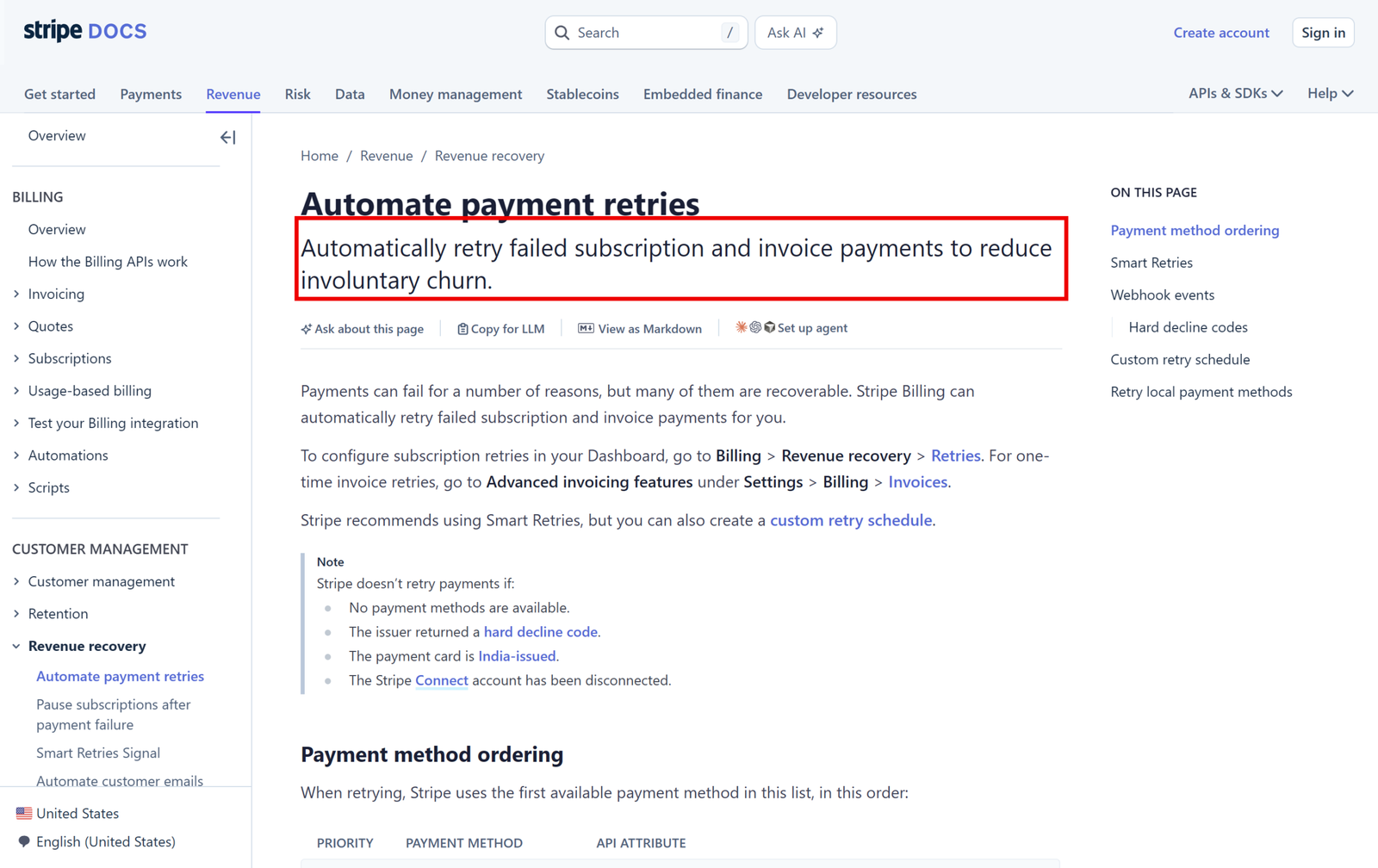
    Example: Stripe Billing, used by many subscription brands, has all three recovery tools built in. Its documentation describes smart retries to reduce involuntary churn, automatic card updates when a customer gets a new card number, and emails when a payment fails.

    Stripe's documentation: automatically retry failed subscription and invoice payments to reduce involuntary churn
    Stripe's documentation: automatically retry failed subscription and invoice payments to reduce involuntary churn. Source: docs.stripe.com, captured October 25, 2026.
    Stripe's revenue recovery documentation
    Stripe's revenue recovery documentation: Stripe automatically updates a customer's card information when they get a new card number. Source: docs.stripe.com, captured October 25, 2026.

    Pro tip: pull your involuntary churn rate before you plan any win-back campaign. Customers lost to an expired card are cheaper to keep than customers who decided to leave.

    Retention Offers Personalized by Customer Segment

    Match the offer to where each customer is in the lifecycle, so the experience feels built for them.

    Segment Signal Offer
    New customers First order shipped Onboarding content and product tips
    Loyal customers Several on-time reorders Early access, exclusive offers and rewards
    Declining customers Gaps between orders growing Recommendations from past orders, product swaps
    At-risk customers Visits to the cancel page Pause, skip or a smaller plan before cancellation
    • Segment by demographics, purchase history and engagement, then tailor campaigns to each group.
    • Recommend products from browsing and purchase history, with AI-driven tools where they help.
    • Address customers by name and send email that matches their interests.

    Retention Content That Keeps Subscribers Engaged

    Publish content that helps customers get more from what they already buy, and keep it public so it also ranks.

    • Personalized newsletters built on past orders and interests.
    • Onboarding guides for new customers, advanced tips for long-term ones.
    • Educational how-to content tied to the product.
    • Members-only perks and early looks at new products.
    • Interactive content such as quizzes and polls.
    • Real customer stories and testimonials.

    Gate the perks, not the help.

    Feedback, Referral and Community Programs That Reduce Churn

    • Feedback and surveys: ask customers regularly what works and what doesn’t, and act on it.
    • Content updates: keep content current based on engagement data and feedback.
    • Community: give customers a place to connect, such as a forum or private group.
    • Referral programs: reward both the customer who refers and the new customer.
    • Fast customer service: a problem solved quickly can turn a complaint into loyalty.
    • Market awareness: watch competitors and shifts in customer behavior, and adapt.

    Product Page Structure for AI Overview and ChatGPT Citations

    Write product and category pages so an answer engine can lift a complete, correct answer from them. That means a direct answer, named products, prices and specs as text, and data that matches the page.

    The payoff is visibility before the click. In the Warby Parker captures above, the AI Overview sits above every organic result, and it answers in Warby Parker’s words. When the answer comes from a competitor instead, the competitor’s numbers and product names are the ones the shopper reads first.

    AI Overview Price Comparisons Across Retailers

    Example: the AI Overview for "precision1 90 pack" includes a Pricing & Retailers list. It names Sam’s Club Contacts at $63.50 to $72.88, Warby Parker at $68.56 first order and $85.70 standard, and Walmart Contacts at $68.89 with FSA and HSA eligibility. The source cards beside it are Walmart Contacts, Lens.com and Samsclubcontacts.com. Warby Parker is named, but it is not a source card in view.

    Google AI Overview for "precision1 90 pack"
    Google AI Overview for "precision1 90 pack": Pricing & Retailers names Warby Parker, but the source cards are Walmart Contacts, Lens.com and Samsclubcontacts.com. Source: Google search for "precision1 90 pack", captured October 25, 2026.

    The Walmart Contacts card shows why it was picked. Its snippet reads like a data row: PRECISION1 90pk daily contact lenses cost $68.89 per box. Product, pack size, price and unit sit in one sentence, which is exactly what the answer needed.

    ChatGPT Cost Answers Cited to Lens.com

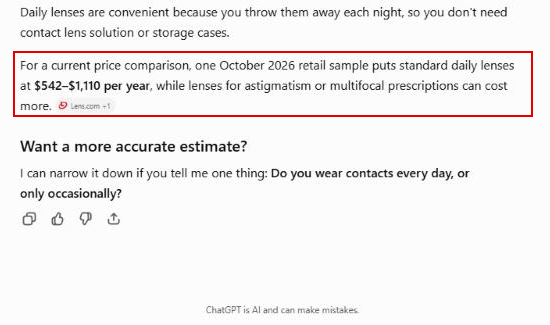
    Here is the other side of that. I asked ChatGPT, logged out, "how much do daily contact lenses cost per year". It gave a general estimate of $600 to $1,200, with no source. Then it quoted a dated retail sample of $542 to $1,110 a year for standard daily lenses, and that is the line it cited to Lens.com.

    ChatGPT, logged out, for "how much do daily contact lenses cost per year"
    ChatGPT, logged out, for "how much do daily contact lenses cost per year": the $542–$1,110 retail sample is the line cited to Lens.com. AI answers vary between sessions. Source: chatgpt.com, captured October 25, 2026.

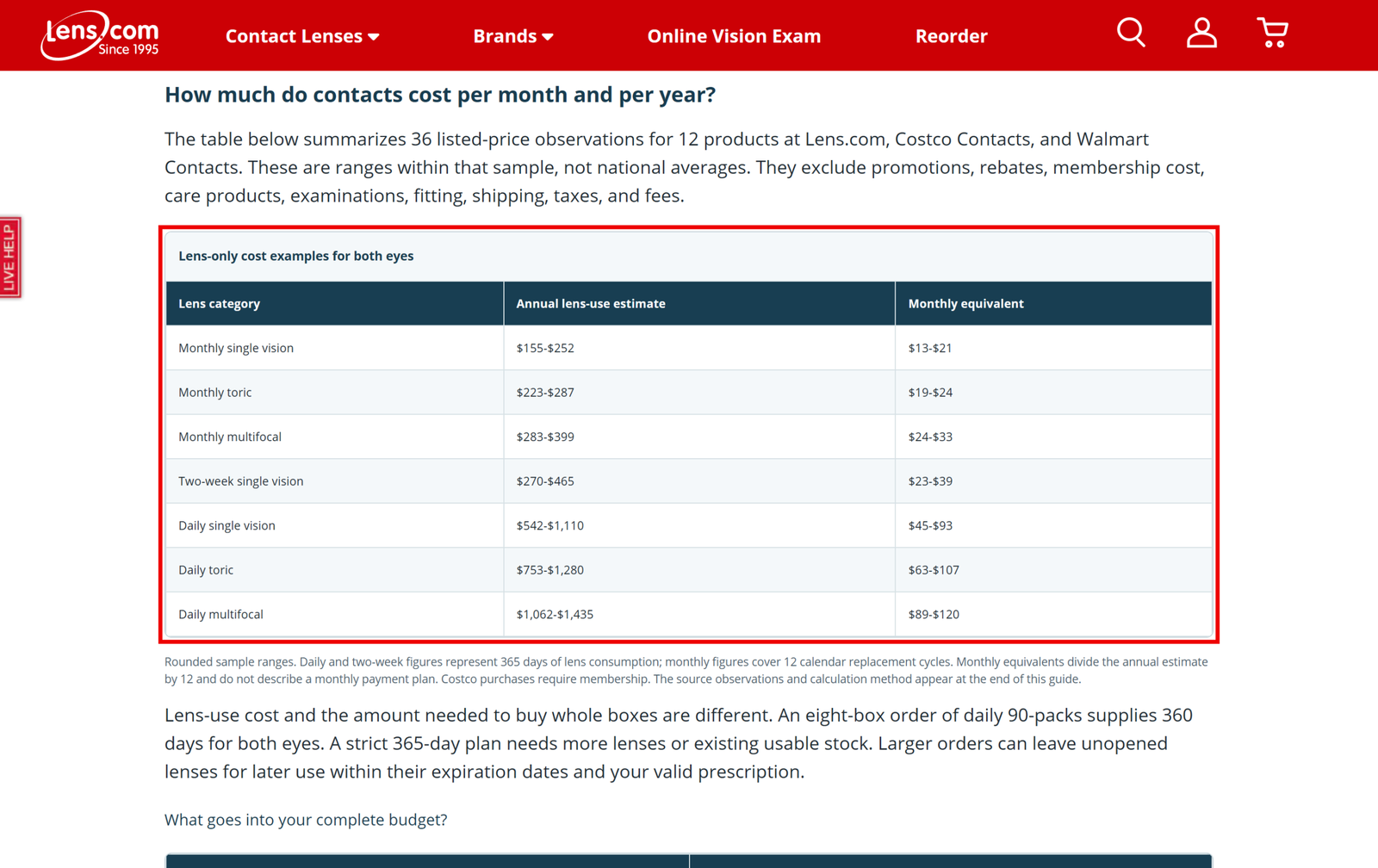
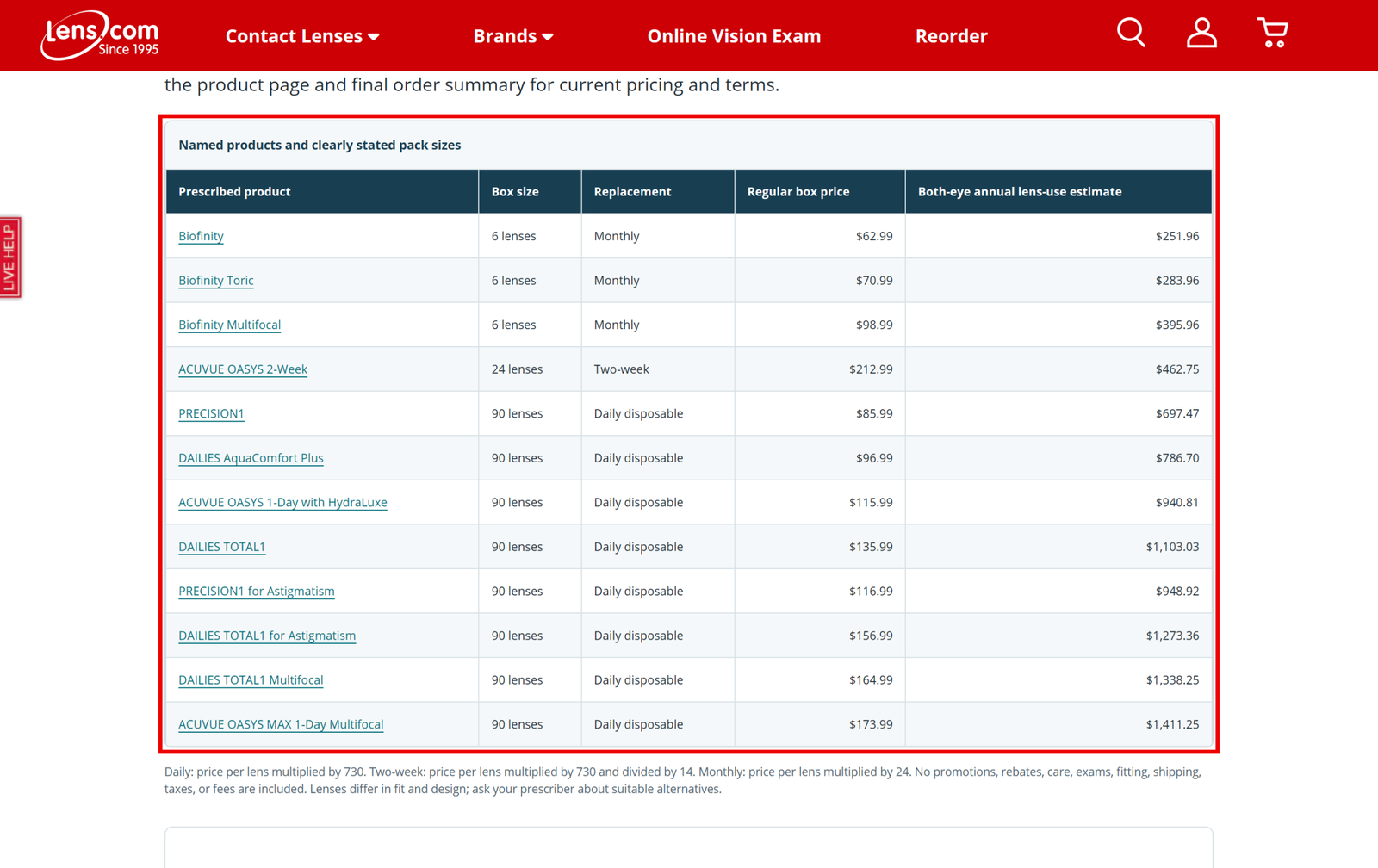
    Lens.com’s cost guide is built to be quoted. It states its retail sample and method, then gives a table of annual cost by lens type, with $542 to $1,110 for daily single-vision lenses. A second table names each product with its pack size and box price, including PRECISION1, 90 lenses, $85.99.

    Lens.com's cost guide: annual cost by lens type for both eyes, including $542–$1,110 for daily single vision, with the
    Lens.com's cost guide: annual cost by lens type for both eyes, including $542–$1,110 for daily single vision, with the sample and exclusions stated above the table. Source: lens.com, captured October 25, 2026.
    The same guide: named products with box size, replacement schedule, regular box price and an annual estimate, such as
    The same guide: named products with box size, replacement schedule, regular box price and an annual estimate, such as PRECISION1, 90 lenses, $85.99. Source: lens.com, captured October 25, 2026.

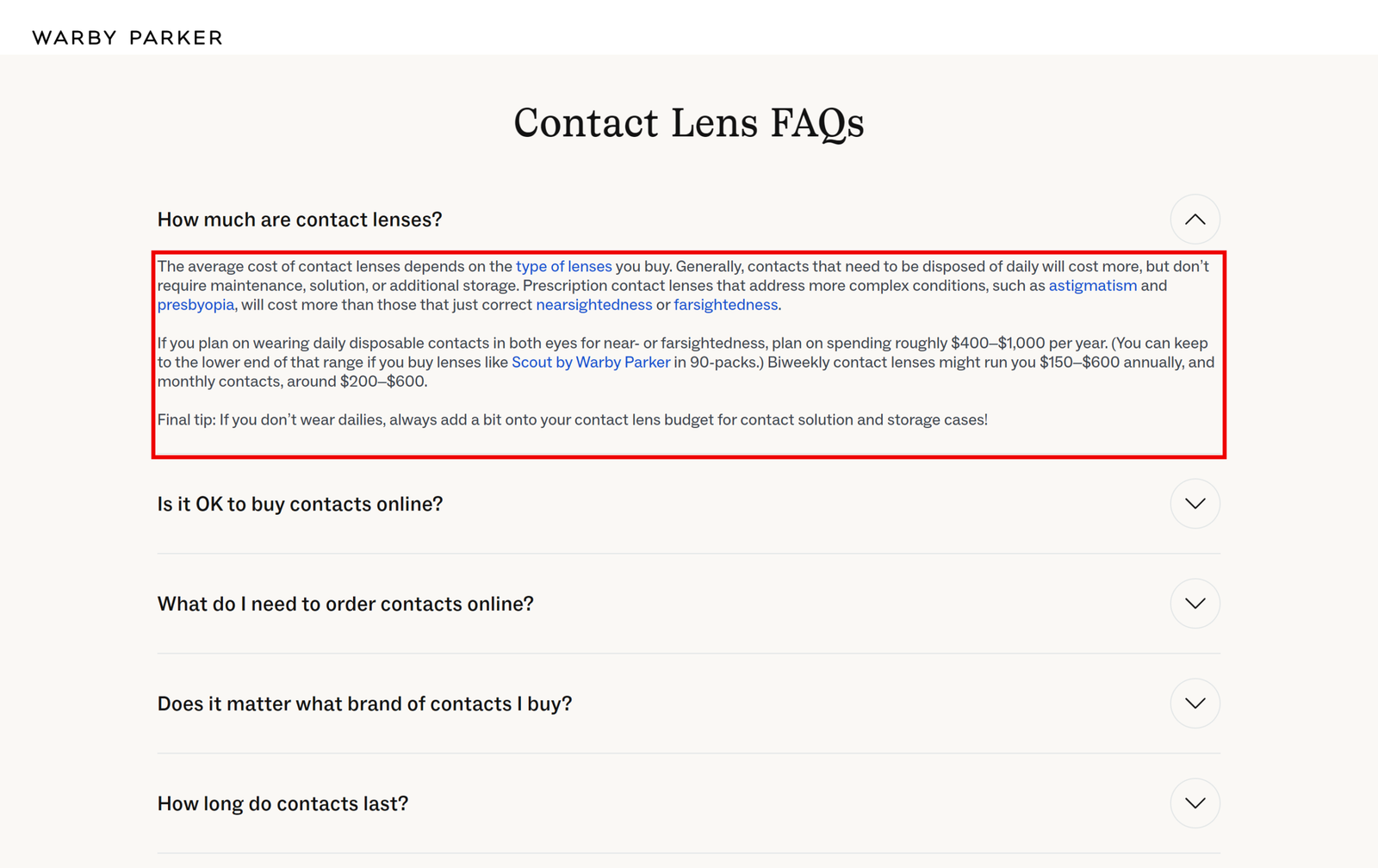
    Warby Parker answers the same question in its contact lens FAQ with one paragraph. It gives a range of $400 to $1,000 a year and suggests Scout, a lens it has since retired. I can’t see inside ChatGPT’s source selection. But the page it cited is the one that states the answer as dated, specific, structured data.

    Warby Parker's contact lens FAQ
    Warby Parker's contact lens FAQ: the cost answer is a single paragraph, and it still points shoppers to Scout, a retired lens. Source: warbyparker.com, captured October 25, 2026.

    This is how retrieval works in plain terms. The engine matches the meaning of the question to passages, then needs a named product and a number it can attribute. A row that reads "PRECISION1, 90 lenses, $85.99" gives it both in one place.

    1. Answer first. Open the section with the direct answer, including the number, in the first two sentences.
    2. Put numbers in tables. Price, pack size, cost per year and key specs, as HTML text, never only in images.
    3. Name things exactly. Use the same brand, product line, pack size and model in the title, heading, table, structured data and feed.
    4. Date and source the data. Say when the prices were checked and how the estimate is calculated.
    5. Keep every answer current. Remove references to retired products, the way the Warby Parker FAQ still recommends Scout.
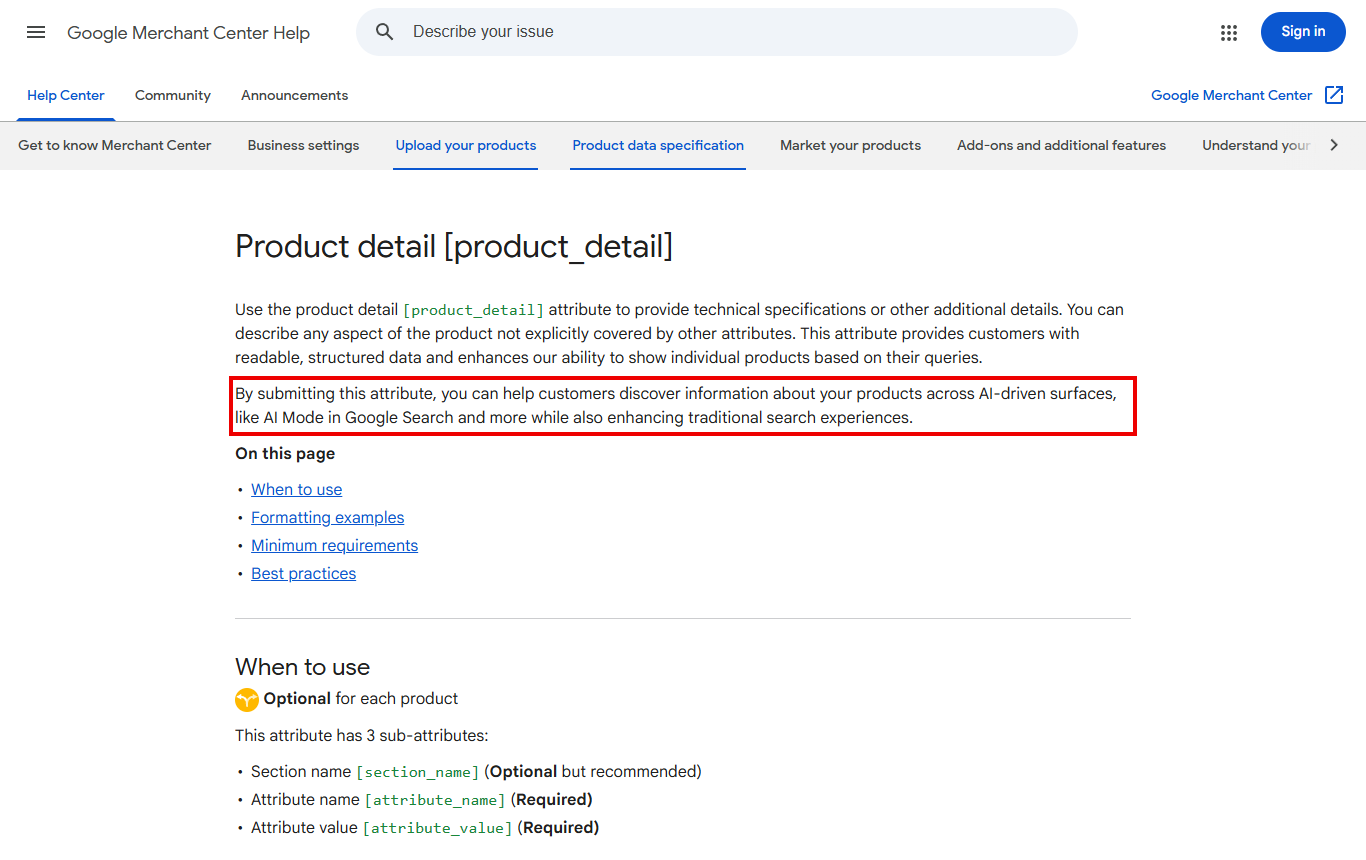
    6. Match the data layer. Structured data and the Merchant Center feed must agree with the page, and product detail attributes feed AI Mode.
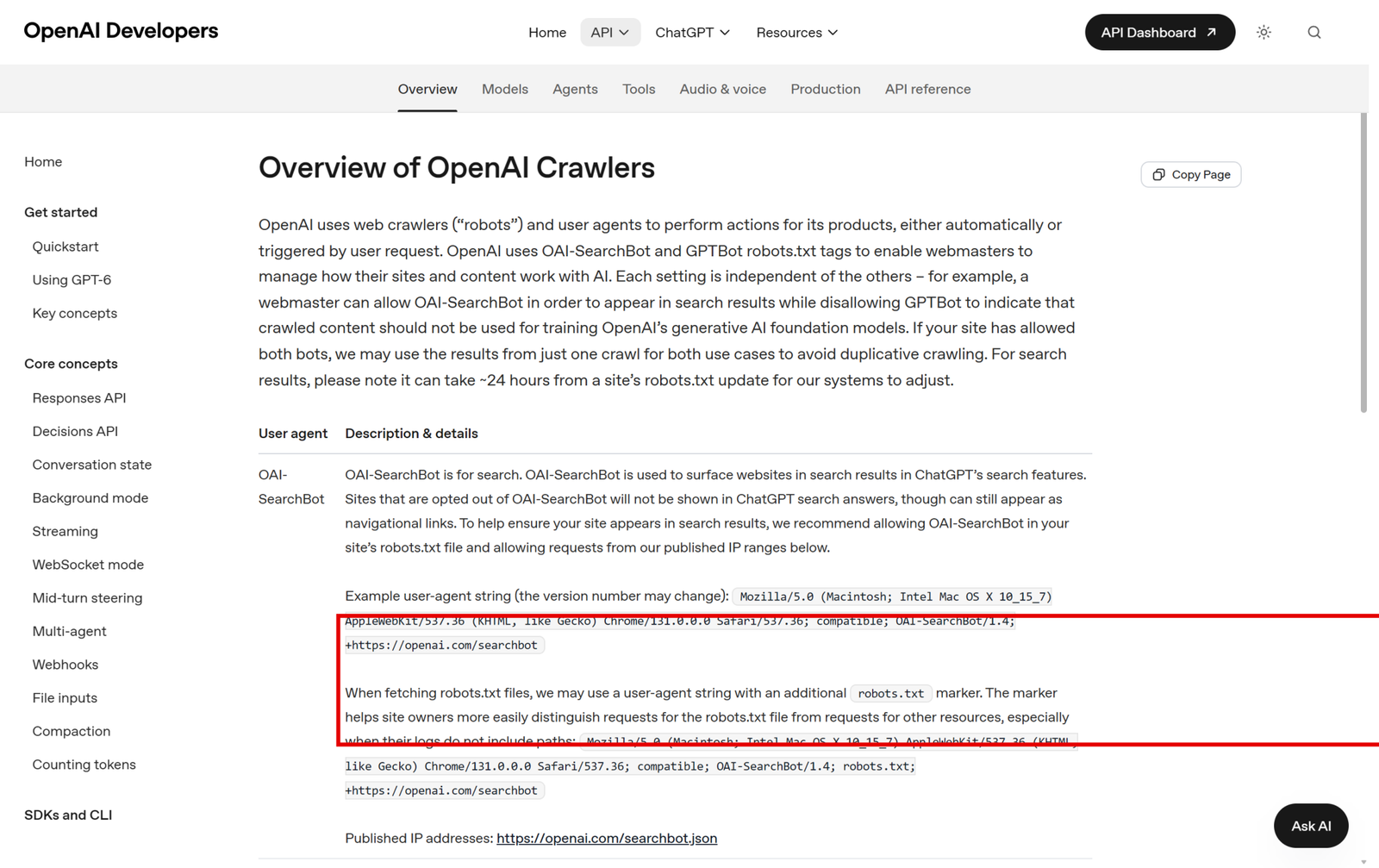
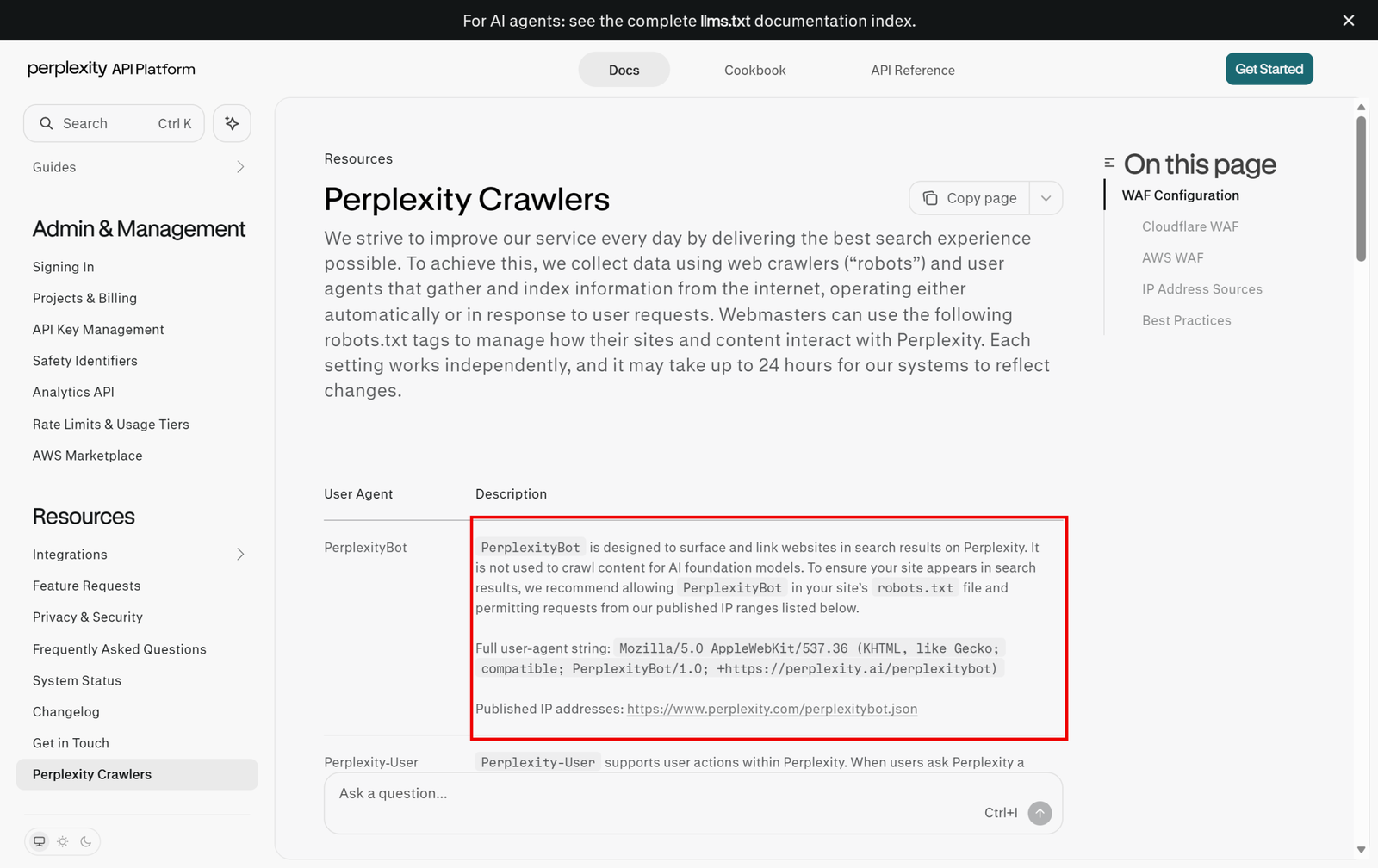
    7. Let AI crawlers in. Check robots.txt allows OAI-SearchBot for ChatGPT search and PerplexityBot for Perplexity.
    8. Measure repeatedly. Run the same prompts several times. Sources cited every time are your stable citations; the rest come and go.
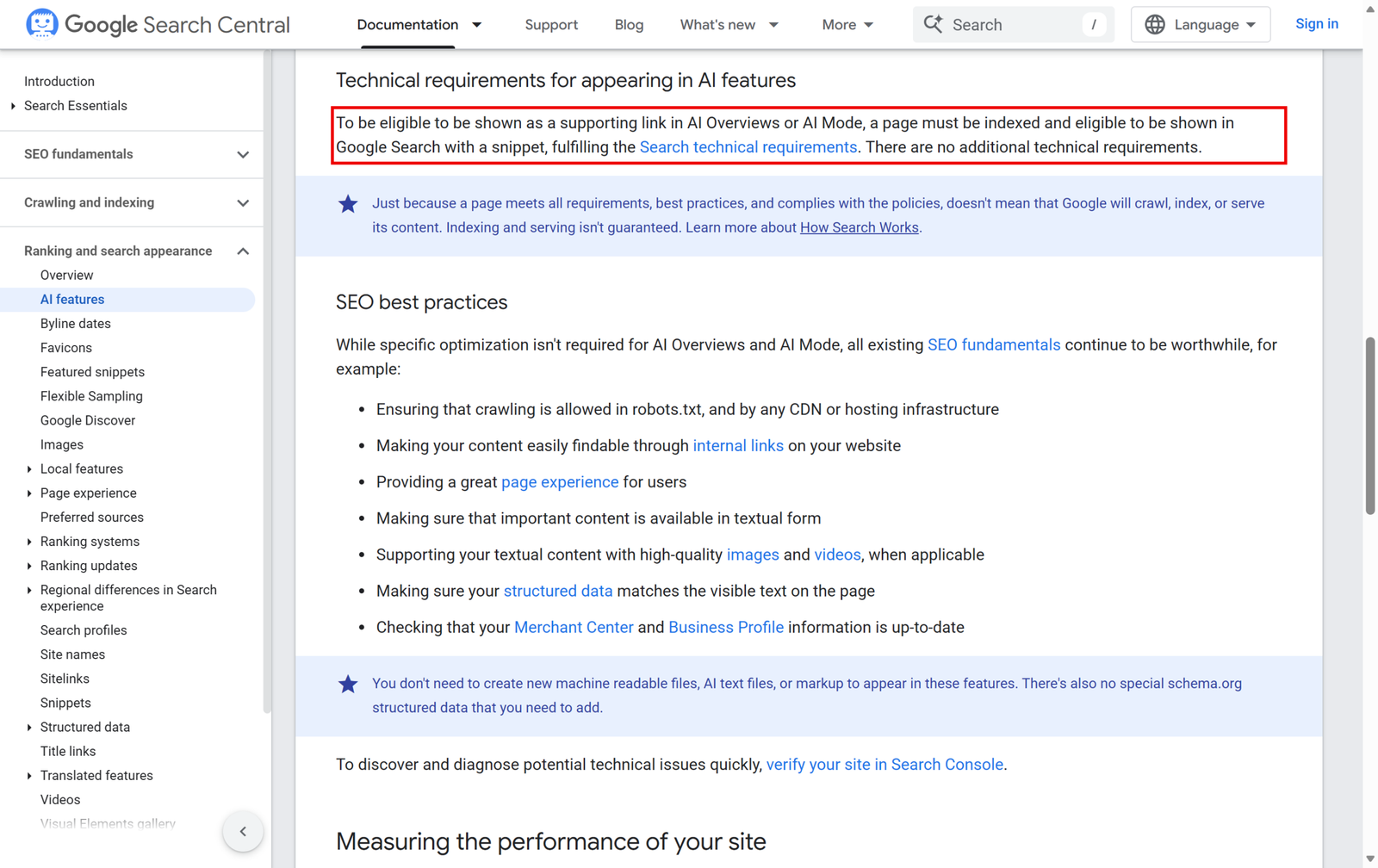
    Google's AI features documentation
    Google's AI features documentation: a page must be indexed and eligible for a snippet; there are no additional technical requirements. Source: developers.google.com, captured October 25, 2026.
    Google Merchant Center help: product detail attributes help customers discover products across AI-driven surfaces, like AI
    Google Merchant Center help: product detail attributes help customers discover products across AI-driven surfaces, like AI Mode. Source: support.google.com, captured October 25, 2026.
    OpenAI's crawler documentation: OAI-SearchBot surfaces websites in ChatGPT search
    OpenAI's crawler documentation: OAI-SearchBot surfaces websites in ChatGPT search. Source: platform.openai.com, captured October 25, 2026.
    Perplexity's crawler documentation: PerplexityBot surfaces and links websites in Perplexity search results
    Perplexity's crawler documentation: PerplexityBot surfaces and links websites in Perplexity search results. Source: docs.perplexity.ai, captured October 25, 2026.

    AI Shopping Apps and Product Feeds in ChatGPT

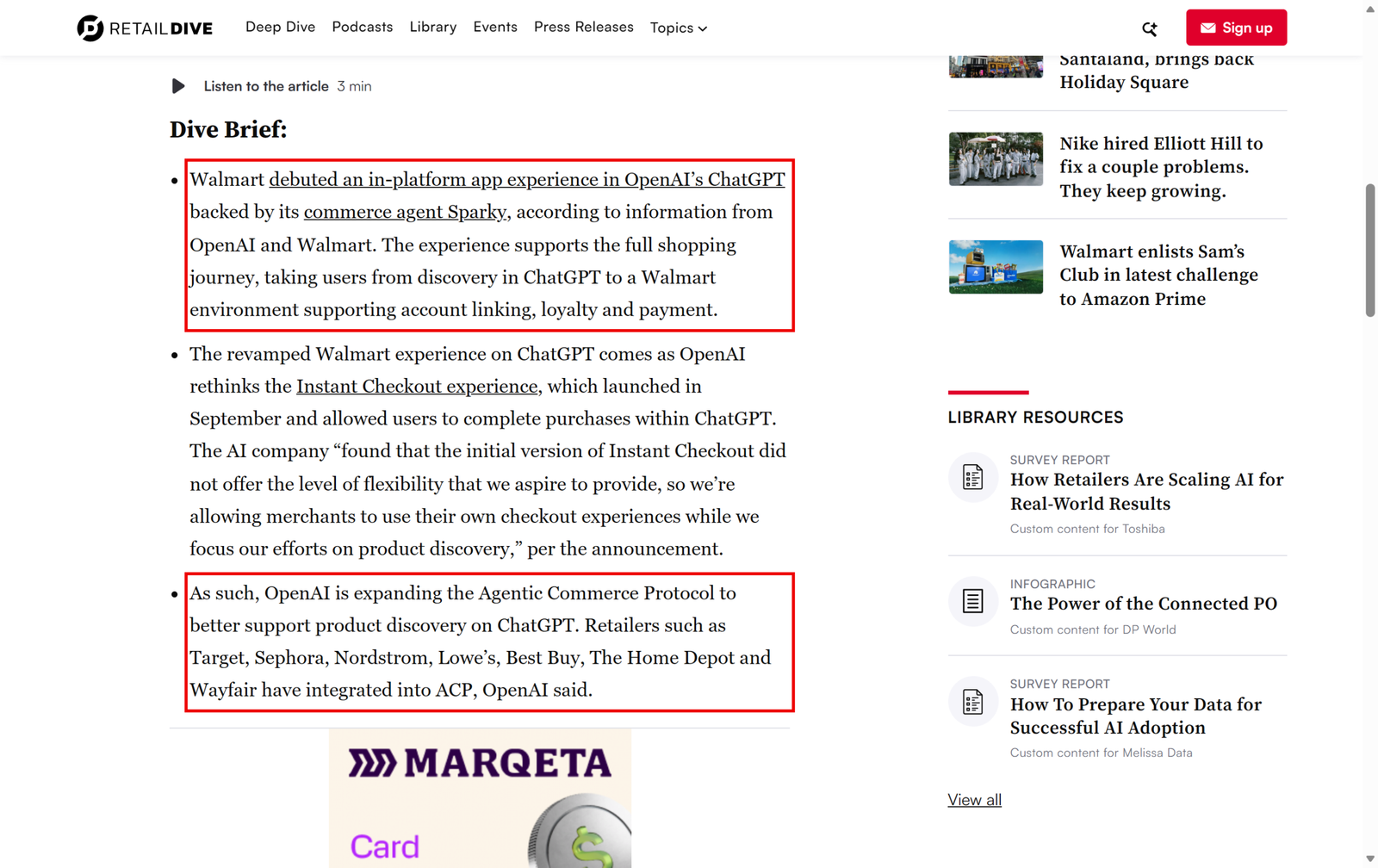
    AI assistants are also becoming storefronts. Retail Dive reported that Walmart launched an app in ChatGPT backed by Sparky, its shopping agent. It takes shoppers from discovery in ChatGPT to a Walmart environment with account linking, loyalty and payment.

    The same report says OpenAI moved Instant Checkout toward product discovery and expanded its Agentic Commerce Protocol. Target, Sephora, Lowe’s, Best Buy, The Home Depot and Wayfair have integrated it, and merchants can share product feeds and promotions with OpenAI.

    Retail Dive: Walmart's Sparky-backed app in ChatGPT, and OpenAI refocusing Instant Checkout on product discovery through the
    Retail Dive: Walmart's Sparky-backed app in ChatGPT, and OpenAI refocusing Instant Checkout on product discovery through the Agentic Commerce Protocol. Source: retaildive.com, captured October 25, 2026.

    The work does not change by platform. A clean feed, pages that match it and prices that agree everywhere are what Google Shopping, AI Overviews and ChatGPT all read.

    If your page does not state the answer, the answer engine will quote someone who does.

    AI Answers About Reorders, Replacements and Cancellations
    Treat your help and product pages as the source AI answers will quote, and keep them accurate.

    Both Warby Parker examples above show it. Google’s AI Overviews built their reorder steps and the Scout replacement story from Warby Parker’s own pages. The same AI Overview also sits next to a result still showing Scout as in stock, which is why the structured data fix matters.

    Run the "how to reorder", "is it worth it", "vs" and "how to cancel" prompts for your brand every month in Google, ChatGPT and Perplexity, and note which sources get cited.

    Subscription Retention and Search Visibility Metrics

    • First-order to second-order conversion rate.
    • Churn rate, split into voluntary and involuntary.
    • Customer lifetime value.
    • Organic traffic to reorder, help, pause and cancel pages.
    • Search Console impressions for branded reorder, replacement and cancel queries.
    • Who Google and AI answers cite for those queries, checked monthly.
    • Your share of Shopping listings on branded product searches, and who bids on them.
    • Merchant Center price mismatch and disapproval counts.

    Churn is rarely one problem. It is a pricing, billing, product and content problem at the same time, and the searches your customers make after the first order show which one is growing.

    Running a subscription or repeat-order store? Get in touch.

    Frequently asked questions

    Keep it live, name the replacement at the top and make it the main button. Then set the structured data to Discontinued so search results stop showing a price.
    Voluntary churn is a customer choosing to cancel. Involuntary churn is a subscription ending because a payment failed, which retries and card updates usually fix.
    Yes. Customers will search for it either way. Your own page can offer pause and skip options before they leave; a Reddit thread cannot.
    Get one useful search insight a week

    Practical analysis without filler. Unsubscribe at any time.

    Keep reading
    Scroll to Top